

PPE detection on existing CCTV: a UK guide for construction, waste and industrial sites
Last reviewed
Short answer: AI PPE detection watches the cameras you already have and flags when someone in an area you choose is not wearing a hard hat or hi-vis. UK law does not require cameras, but employers must provide suitable PPE and take all reasonable steps to make sure it is used. Detection can support that, provided you set clear zone rules, keep a person reviewing alerts, tell workers and complete a DPIA first.[2][4][12]

What is AI PPE detection?
AI PPE detection is software that looks at a CCTV picture, finds the people in it and checks whether each person is wearing the protective equipment a rule asks for. When someone in a watched area is missing an item, it raises an alert for a person to look at.
It does not need special cameras. The software connects to the recorder or cameras already on site, so the same cameras that watch the gate at night for intruders can check for hard hats at the turnstile in the morning. Each camera feed is analysed continuously, and only the moments that break a rule turn into alerts, each with a short clip so the person receiving it can see what happened.
On Woodcock AI, PPE detection checks for two items: hard hats and hi-vis vests or jackets. Those are the two items most UK construction, waste and industrial sites ask everyone to wear in their working areas, and the two that stand out clearly enough on a typical CCTV picture. Which of your cameras can support the check is confirmed in your free site assessment.
PPE detection is a supervision aid, not a replacement for supervision. A site manager cannot stand at every gate and walkway all day; cameras can watch those places continuously and point the manager to the moments that need a word. The decision about what happens next stays with people.

- Where PPE is issuedHard hats and hi-vis are kept at the entrance, so everyone can pick them up before they reach the turnstile.
- The check pointThe turnstile is a natural place for a PPE zone: everyone passes through it, one at a time, facing the camera.
- The camera you already haveAn existing CCTV camera looking down at the turnstile can usually take on the PPE check without new hardware, subject to the free site assessment.
What does UK law say about PPE at work?
The main law is the Personal Protective Equipment at Work Regulations 1992, as amended in 2022. On construction sites, the Construction (Design and Management) Regulations 2015 add duties to plan, manage and monitor the work. None of them requires cameras, but all of them expect employers to make sure PPE is actually used.[1][10]
The PPE at Work Regulations 1992
Regulation 4 says employers must make sure suitable PPE is provided to workers who may be exposed to a risk to their health or safety, unless that risk is adequately controlled by other means that are equally or more effective.[2] Regulation 9 says people given PPE must also get adequate and appropriate information, instruction and training, so they know the risks, why the PPE is needed and how to use it.[3]
Regulation 10 is the one most relevant to PPE detection. It says employers must take all reasonable steps to ensure PPE is properly used, and that workers must use it in line with the training and instructions they have been given, and return it to where it is kept after use.[4] Supervision, site rules, induction and spot checks are the usual reasonable steps. Cameras can help with the checking part.
What changed in 2022
From 6 April 2022, the Personal Protective Equipment at Work (Amendment) Regulations 2022 extended these duties to a wider group of workers.[5] HSE explains that the duties now cover limb (b) workers as well as employees: broadly, people who work under a contract to do the work personally but are not employees, which on many sites includes casual and some agency workers. Where a risk assessment shows PPE is needed, it must be provided free of charge.[6] In practice, the same PPE rules and the same checks should apply to everyone working in an area, whatever their contract.
PPE is the last line of protection
HSE is clear that PPE should be used only after other controls have been considered, such as removing the hazard, engineering controls and safe systems of work.[7][8] A PPE zone at the gate does not replace a one-way traffic route or barriers between people and plant. It helps make sure the last line is in place where those other controls leave a risk.
Hard hats and hi-vis on construction sites
Since 6 April 2013, head protection on construction sites has been covered by the PPE at Work Regulations, after the Construction (Head Protection) Regulations 1989 were revoked. HSE says that on almost all construction sites the risk of head injury means head protection must be worn, and suggests making it a site rule and checking others are wearing theirs.[9]
There is an important exemption: turban-wearing Sikhs are exempt from any legal requirement to wear a safety helmet at work, including on construction sites. The exemption covers head protection only.[9] It is one of several reasons a PPE alert should always be reviewed by a person before anyone acts on it: a camera can see that there is no hard hat, but only a person can judge whether that is a breach.
For hi-vis, HSE says high-visibility clothing should be worn in all construction locations where vehicles or plant are operating, including by drivers when they leave their vehicle, and that a tabard is often enough for routine site use.[9]
CDM 2015: plan, manage and monitor
On construction projects, regulation 13 of CDM 2015 requires the principal contractor to plan, manage and monitor the construction phase and coordinate health and safety, and to make sure a suitable site induction is provided.[10][11] Hard hat and hi-vis rules are part of most site inductions, and PPE detection gives the principal contractor another way to monitor whether the rules are followed at the places that matter.
- PPE Regulations, reg 4
Provide it
Suitable PPE must be provided where people may be exposed to a risk to their health or safety that is not adequately controlled in other ways. It must suit the risk, the conditions and the period it is worn.[2]
- PPE Regulations, reg 9
Explain it
People given PPE must get adequate and appropriate information, instruction and training on the risks, why the PPE is needed and how to use it.[3]
- PPE Regulations, reg 10
Make sure it is used
Employers must take all reasonable steps to ensure PPE is properly used. Workers must use it in line with their training and instructions, and put it back where it is kept.[4]
- CDM 2015, reg 13
Monitor the site
On construction projects the principal contractor must plan, manage and monitor the construction phase, coordinate health and safety, and provide a suitable site induction.[10]
This guide is general information, not legal advice. Your risk assessment decides where PPE is needed. Scotland and Northern Ireland have their own versions of some regulations. Read the CCTV compliance hub for the wider rules on camera systems.
Which PPE can cameras check?
Woodcock AI checks two items: hard hats and hi-vis vests or jackets. Both are large, worn in a predictable place and designed to stand out, which is what makes them suitable for a camera check.
Hard hats. The check looks at each person's head and decides whether a hard hat is being worn. A hard hat carried in a hand or clipped to a bag is not being worn, and a rule can treat it that way.
Hi-vis vests and jackets. The check looks at each person's upper body for high-visibility clothing, whether a tabard, a vest or a jacket. In daylight and under good lighting, the bright fluorescent colour does most of the work. At night on infrared, the camera relies on shape and reflective tape instead, as explained below.
That is the full list. If your risk assessment calls for other equipment in an area, cameras are not checking it, so supervision, induction and your existing checks still need to cover it. Being clear about this in your DPIA and worker notice avoids anyone assuming the cameras watch for more than they do.

What affects how well PPE detection works?
The camera's view matters more than anything else. A good view of people at the place where the rule applies gives the software what it needs; a poor view does not, however good the software is.
Distance
The further away a person is, the fewer pixels they take up, and the harder it is to tell a hard hat from a hood or a hi-vis vest from a bright jumper. Cameras watching gates, turnstiles and walkways from close by usually give the clearest results. A wide camera covering a whole yard can still be useful for hi-vis in the nearer part of the view.
Angle
A camera mounted very high and looking straight down sees the tops of heads, which helps with hard hats but shows little of the upper body. A camera that is too low is easily blocked. Views from a moderate height, looking along the direction people walk, tend to show both the head and the upper body.
Lighting
Even lighting helps. Strong backlight, such as a camera facing an open gate on a bright morning, can turn people into silhouettes. Floodlights shining into the lens wash out the picture. Lighting placed beside the camera, not in its view, usually works best.
Night and infrared
When light levels drop, many cameras switch to infrared and the picture turns black and white. Hi-vis loses its fluorescent colour on infrared, so the camera relies on the garment's shape and on reflective tape, which often shows up brightly. Hard hats are judged by shape on infrared, as they are in daylight. Some night views work well and some do not, so each one is checked.
Obstructions and weather
Pallets, parked vehicles, fences and other people can hide part of a person. Heavy rain, mist and low sun all reduce what a camera sees. None of these stop detection everywhere, but they explain why a system that checks each camera view separately does better than one set-up applied to every camera.
No PPE detection system sees everything. Each of your camera views is assessed separately before anything is switched on, and which ones support hard hat and hi-vis detection is confirmed in your free site assessment.

- Dome cameraDomes often watch wide areas. Their view is fine for hi-vis close by but people at the far edge may be too small.
- Bullet cameraBullets are often aimed at gates and doors, which can make them a good choice for a PPE zone at an entrance.
- FloodlightLighting beside the camera helps at night. A floodlight shining into another camera washes out its view.
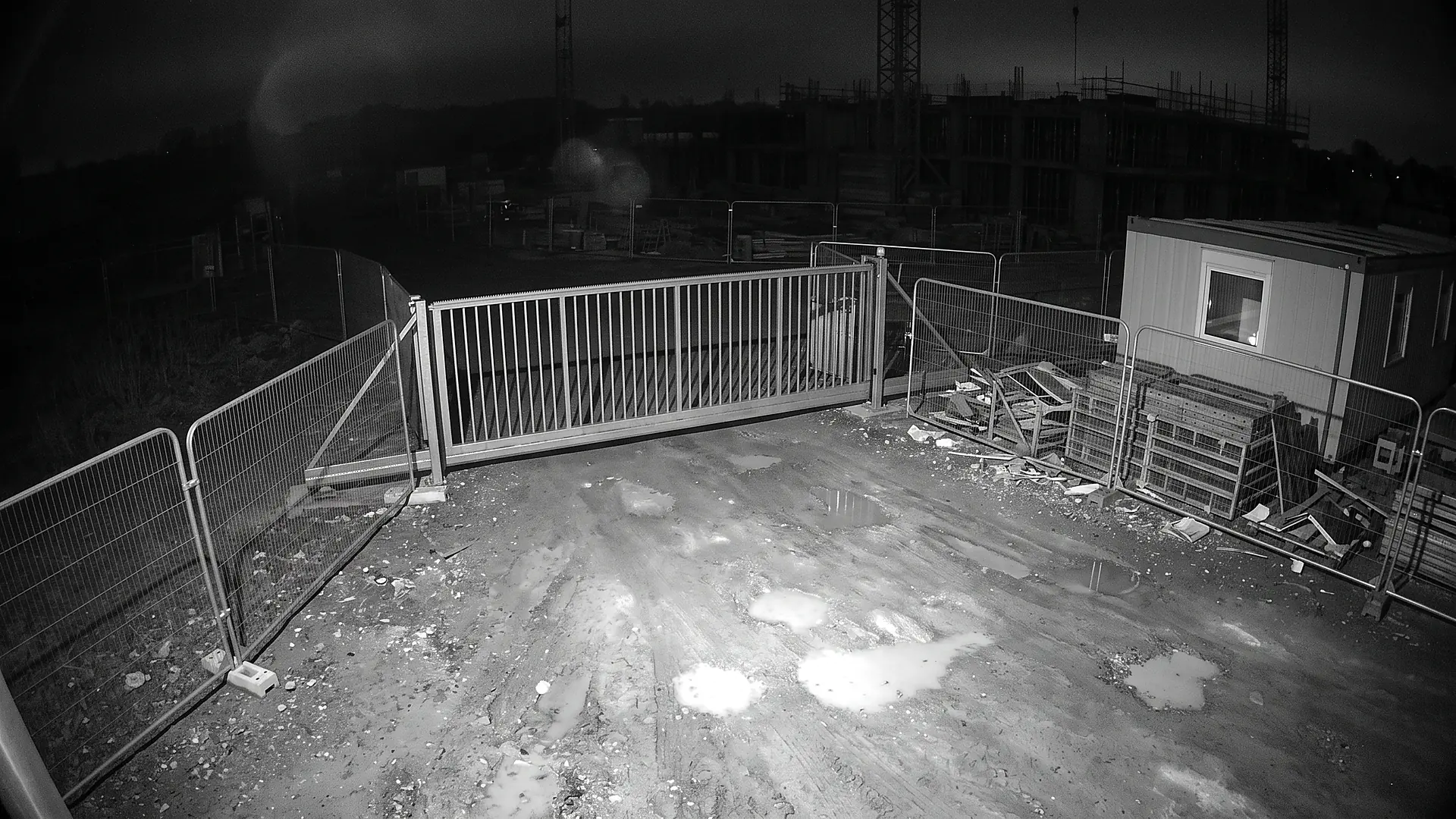
What a camera sees on infrared
On infrared, colour disappears. Hi-vis is no longer bright orange or yellow, so detection depends on the garment shape and the reflective tape that lights up under infrared.
Gates that stay busy after dark are worth checking at night as well as by day, because the same camera can perform very differently after it switches to infrared.
How do PPE rules work per zone and per schedule?
PPE rules almost never apply to a whole camera view. A camera at the gate also sees the car park; a camera over the yard also sees the welfare cabins. So rules need to apply to areas, and to times.
Woodcock AI uses polygon detection zones: you draw a shape with as many corners as you need round the exact area a rule applies to, such as the turnstile, a walkway or the plant yard, and the rule only applies inside it. Most camera systems offer rectangles, which take in areas you did not mean to include. A polygon follows the edge of a path or a yard, so a person walking just outside it does not cause an alert.
Each zone then gets its own rule and schedule. The gate might need hard hats and hi-vis from 06:00 to 19:00, Monday to Saturday. The plant yard might need hi-vis whenever plant is operating. Welfare areas and the car park are left out altogether. One camera can carry several zones with different rules.

Pick a zone to see its rule
Select an area on the plan, or use the buttons, to see the kind of rule a site might set there. Without JavaScript, every zone's rule is listed below the plan.
Site gate and turnstile
- PPE checked
- Hard hat and hi-vis
- Schedule
- During site hours, for example 06:00 to 19:00
- Alerts go to
- Gate team and site manager
Everyone passing through the gate is about to enter the working site, so it is the natural place to check both items before people reach plant and scaffolding.
Ask your cameras“Show me anyone without a hard hat at gate 2 this morning?”
Plant and vehicle yard
- PPE checked
- Hi-vis, plus hard hats if your risk assessment requires them
- Schedule
- While plant is operating, for example 06:00 to 18:00
- Alerts go to
- Yard supervisor
HSE expects high-visibility clothing wherever vehicles or plant are operating on construction sites. Draw the zone round the operating area only, not the whole camera view.
Ask your cameras“Was anyone in the plant yard without hi-vis after 2pm yesterday?”
Racking aisle
- PPE checked
- Hard hat and hi-vis
- Schedule
- All shifts
- Alerts go to
- Shift manager
Where your risk assessment calls for head protection in racking areas, a zone on the aisle floor keeps the check to the people actually in the aisle.
Ask your cameras“Show me the clips from aisle 4 where someone had no hi-vis on the night shift?”
Pedestrian walkway
- PPE checked
- Hi-vis
- Schedule
- Around the clock
- Alerts go to
- Site manager
A narrow zone along a marked walkway can carry a lighter rule than the plant area beside it, because polygons follow the shape of the path.
Ask your cameras“Any walkway alerts on camera 2 since Monday?”
Welfare cabins and car park
- PPE checked
- No PPE rule
- Schedule
- Not watched for PPE
- Alerts go to
- Nobody: no PPE alerts here
Leave break areas, cabins and car parks out of every PPE zone so people on a break or arriving at work do not trigger alerts. The cameras still record as normal.

Find out which of your cameras can check PPE
A free site assessment looks at the cameras covering your gates, yards and work areas and confirms, camera by camera, where hard hat and hi-vis detection is supported, before anything is switched on.
What happens when someone is not wearing PPE?
When someone in a zone is seen without the PPE the rule asks for, an alert goes to the people you choose for that zone and shift.
Alerts go out by the Woodcock AI app, with the clip attached, and by email. Each alert carries a short plain-English description of what the camera saw, such as a person entering the gate wearing hi-vis but no hard hat, so the person receiving it can understand the alert before opening the clip. Alerts to a monitoring centre (ARC) and phone-call alerts are available as optional add-ons.
What happens next is up to you. Most sites start with a friendly word at the time and look for patterns, such as the same gate being a problem first thing in the morning, rather than treating every alert as a disciplinary matter. That approach is easier to justify in your DPIA and easier to explain to workers.
Keep the alert list short. Sending every PPE alert to everyone means nobody owns them. Name one person per zone and shift, and a back-up.
“A person walked through the Gate 2 turnstile wearing hi-vis but no hard hat.”
How does the system learn your site?
Every site looks different: a different gate, a different light, different coloured cladding behind the turnstile. A model trained only on generic footage meets your site for the first time on day one.
Woodcock AI is self-learning. Models are fitted to each camera's own scene, and the ordinary footage where nothing is wrong is used as training signal, so the system learns what normal looks like at that gate or in that aisle.
Every alert has a feedback button. When someone marks an alert as correct or wrong, that feedback goes back into training for that camera. A hi-vis jacket hidden behind a pallet, or yellow signage that looks like a vest from a distance, is exactly the kind of thing feedback teaches the system about.
Feedback is also a simple record of human review. Each alert has been looked at by a person who decided whether it was right, which is the behaviour you want to describe in your DPIA.
Can I search my cameras for PPE in plain English?
“Show me anyone without a hard hat at gate 2 this morning”
This morning · clip
This morning · clip
Yes. With ask your cameras, you type a question the way you would ask a colleague, and Woodcock AI finds the matching moments.
For example: “show me anyone without a hard hat at gate 2 this morning”. The answer is a list of clips from that camera and time, which you can watch and download. There is no need to scrub through hours of recording or learn a search screen.
It is useful after the fact: checking how often a rule was missed on a new gate, reviewing a week before a toolbox talk, or finding a clip a manager asks for. Downloaded clips should be handled in line with your retention policy and DPIA, like any other CCTV footage.
The same plain-English approach extends to setting up the system itself. You can describe a change to your detection design, such as adding a hi-vis rule to the walkway on camera 2, rather than working through settings menus.
Privacy, telling workers and the DPIA
PPE detection processes images of people at work, so UK GDPR and the Data Protection Act 2018 apply. The ICO's guidance on monitoring workers sets out what employers should do.[12][13]
Tell people
The ICO says employers must tell workers about monitoring, apart from very exceptional circumstances where covert monitoring is justified.[12] For PPE detection that means saying, in plain words, which areas are watched, what the cameras check (hard hats and hi-vis), why, who sees the alerts, how long clips are kept and what happens after an alert. Put it in your privacy information, on signs at the entrance and in the site induction, so visitors and subcontractors hear it too.
Do a DPIA first
The ICO says you must carry out a data protection impact assessment before monitoring that is likely to result in high risk, and recommends one for monitoring even where there is no specific high risk.[12] A DPIA for PPE detection should record the purpose, the lawful basis, which zones and hours are covered, why less intrusive options are not enough, retention, who can see what, and the human review step. Talking to workers or their representatives while you prepare it is good practice and usually improves the result.
Keep it proportionate
Polygon zones and schedules are a privacy tool as well as an alerting tool. Watching only the gate during site hours, and leaving welfare cabins and car parks out entirely, is easier to justify than checking every camera around the clock. PPE detection only needs to know whether an item is seen; your process should not use it to monitor individuals' performance. The AI CCTV and GDPR guide covers the wider rules in more detail.

Find out which of your cameras can check PPE
A free site assessment looks at the cameras covering your gates, yards and work areas and confirms, camera by camera, where hard hat and hi-vis detection is supported, before anything is switched on.
How to roll out PPE detection on existing CCTV
Eight steps take you from your risk assessment to PPE detection you can explain to workers, clients and the regulator. Tick them off as you go: your progress is saved in this browser only.
Start with your risk assessment
List the areas where your risk assessment says hard hats or hi-vis are needed, and why. PPE comes after other controls, so note those too.
Map cameras to those areas
Mark each camera on a site plan and note what it sees of each PPE area: distance, angle, lighting and whether it switches to infrared at night.
Book the free site assessment
We check which cameras can connect and which views support hard hat and hi-vis detection, camera by camera, before anything is switched on.
Draw polygon zones and set schedules
Draw each zone round the area where the rule applies, leave out welfare areas and roads, and set the hours when each rule is active.
Agree who gets alerts and what they do
Choose who receives app alerts with the clip and email for each zone and shift, and agree a simple, proportionate response, starting with a conversation.
Complete the DPIA and tell people
Record the purpose, lawful basis and retention in a DPIA, update your privacy information, signs and induction, and talk to workers or their representatives.
Run a supervised trial
Run the rules for an agreed period on a few cameras, review every alert, and use the feedback button so the system learns each scene.
Review and widen
Check the trial against your purpose, adjust zones and schedules, then add cameras. Review again after changes to the site, the cameras or the rules.
Woodcock AI offers an end-to-end service, from site survey and design to supply, installation, commissioning, go-live and ongoing support, if you want help with any of these steps. Support is available 24/7.
Can existing CCTV detect hard hats and hi-vis?
Often, yes. AI software can watch the picture from cameras you already have and check whether people in an area you choose are wearing a hard hat and hi-vis. Whether it works on a particular camera depends on its view, distance, angle and lighting, which is confirmed in your free site assessment.
Which PPE does Woodcock AI detect?
Woodcock AI PPE detection checks for two items: hard hats and hi-vis vests or jackets. It does not check other PPE. If your risk assessment requires other equipment, supervision, training and your own checks still cover it.
Is PPE detection a legal requirement?
Do we have to tell workers about AI PPE monitoring?
Yes. The ICO says employers must tell workers about monitoring, apart from very exceptional circumstances where covert monitoring is justified. Update your privacy information, signs and site induction, and explain what the cameras check and why.[12]
Do we need a DPIA for PPE detection?
The ICO says you must carry out a DPIA before monitoring that is likely to result in high risk, and recommends one even where there is no specific high risk. In practice, complete one before you switch PPE detection on, and record the decision.[12]
Does PPE detection work at night?
It can, where the camera has a clear enough view. On infrared the picture is black and white, so the fluorescent colour of hi-vis is not visible and the camera relies on shape and reflective tape. Night views are checked camera by camera in the free site assessment.
Can PPE rules apply only to certain areas and times?
Yes. With Woodcock AI you draw polygon zones round the exact areas where a rule applies and set a schedule for each, so a gate can require hard hats and hi-vis during site hours while welfare areas have no PPE rule at all.
How are PPE alerts sent?
Alerts go out by the Woodcock AI app, with the clip, and by email, to the people you choose for each zone and shift. Alerts to a monitoring centre (ARC) and phone-call alerts are available as optional add-ons.
Sources
Law and regulatory guidance referred to on this page.
- The Personal Protective Equipment at Work Regulations 1992 (SI 1992/2966), as amended. The main UK regulations on PPE at work. Regulation 4 requires suitable PPE to be provided; regulation 9 covers information, instruction and training; regulation 10 covers use. Last checked 25 October 2026.
- PPE at Work Regulations 1992, regulation 4: Provision of personal protective equipment. Employers must ensure suitable PPE is provided to workers who may be exposed to a risk to their health or safety, except where the risk is adequately controlled by other means that are equally or more effective. Last checked 25 October 2026.
- PPE at Work Regulations 1992, regulation 9: Information, instruction and training. Workers provided with PPE must be given adequate and appropriate information, instruction and training. Last checked 25 October 2026.
- PPE at Work Regulations 1992, regulation 10: Use of personal protective equipment. Employers must take all reasonable steps to ensure PPE is properly used; workers must use it in accordance with their training and instructions and return it to the accommodation provided. Last checked 25 October 2026.
- The Personal Protective Equipment at Work (Amendment) Regulations 2022 (SI 2022/8). The amendment that extended the 1992 Regulations to a wider group of workers from 6 April 2022. Last checked 25 October 2026.
- HSE, Personal Protective Equipment at Work (Amendment) Regulations 2022. Explains that since 6 April 2022 the duties extend to limb (b) workers, and that PPE must be provided free of charge where the risk assessment shows it is needed. Last checked 25 October 2026.
- HSE, Personal protective equipment (PPE) at work: overview. HSE overview of PPE duties, including that PPE should be used only after other controls, such as engineering controls and safe systems of work, have been considered. Last checked 25 October 2026.
- HSE, Personal protective equipment at work: Guidance on Regulations (L25). HSE guidance on the PPE at Work Regulations. Last checked 25 October 2026.
- HSE, Construction: PPE frequently asked questions. Head protection on construction sites, making it a site rule and checking it is worn, the exemption for turban-wearing Sikhs, and high-visibility clothing where vehicles or plant are operating. Last checked 25 October 2026.
- The Construction (Design and Management) Regulations 2015, regulation 13: Duties of a principal contractor. The principal contractor must plan, manage and monitor the construction phase and coordinate health and safety, and ensure a suitable site induction is provided. Last checked 25 October 2026.
- HSE, CDM 2015: Principal contractors. HSE summary of what principal contractors must do, including planning, managing, monitoring and coordinating the construction phase and site inductions. Last checked 25 October 2026.
- ICO, Employment practices and data protection: monitoring workers. Employers must tell workers about monitoring except in very exceptional circumstances, and must carry out a DPIA before processing likely to result in high risk; the ICO recommends a DPIA even where there is no specific high risk. Last checked 25 October 2026.
- ICO, Video surveillance (including guidance for organisations using CCTV). ICO guidance on CCTV and video surveillance under UK GDPR and the Data Protection Act 2018. Last checked 25 October 2026.

See where your cameras can check hard hats and hi-vis
A free site assessment reviews the cameras you already have, confirms which views support PPE detection, and shows how zones, schedules and alerts would be set up for your gates, yards and work areas. Alerts to a monitoring centre (ARC) and phone-call alerts are available as optional add-ons.