Comparison

Video AI vs thermal cameras vs on-camera analytics for fire and intrusion

Last updated

Video AI on existing CCTV spots visible smoke, flame, people and vehicles without new cameras. Thermal cameras read heat, suiting hidden hotspots and darkness, but need new hardware. On-camera analytics run simple rules on supported cameras. Most sites combine them: video AI for wide coverage, thermal for the hottest risks.

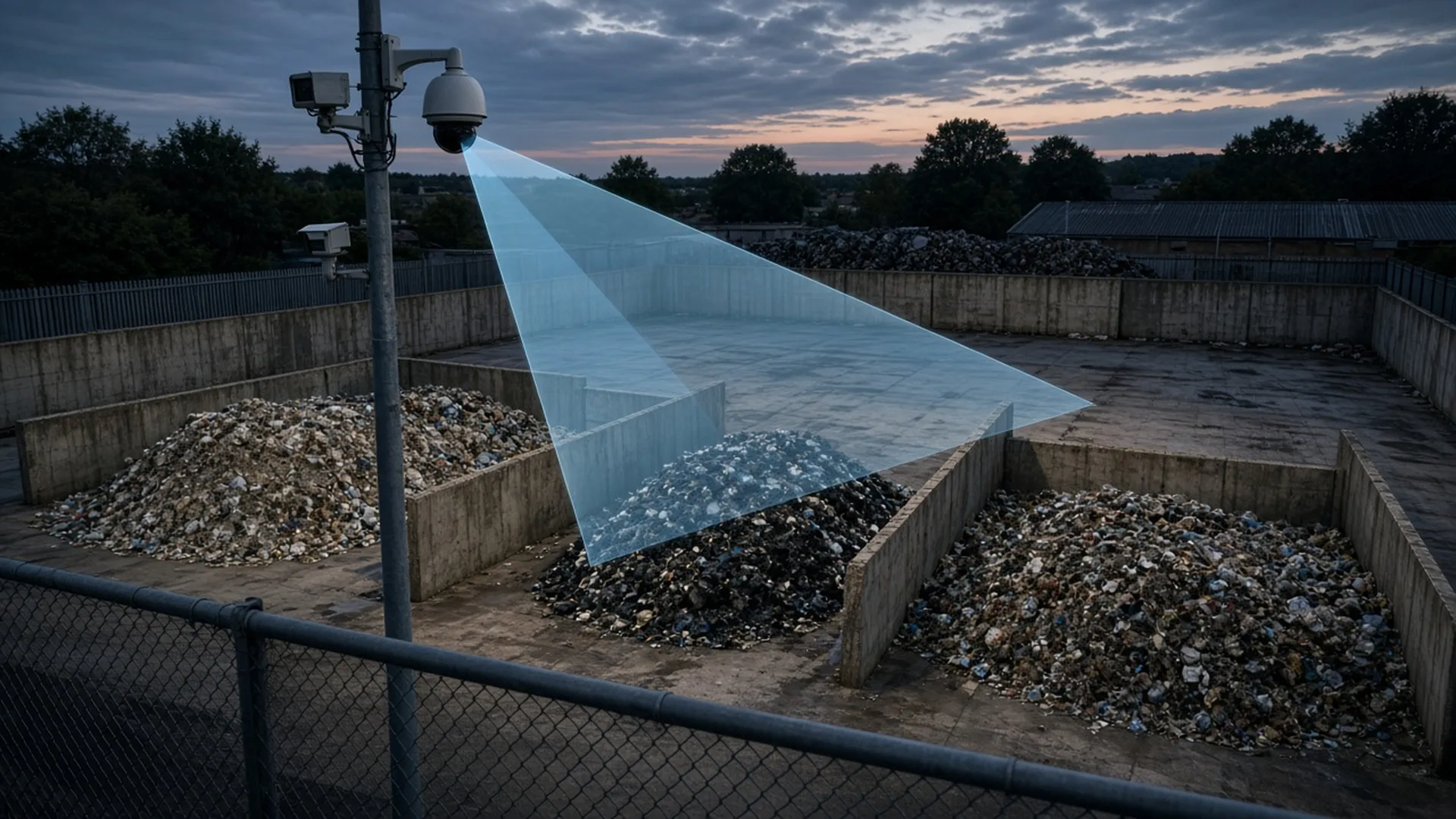
Comparison of a narrow thermal camera view and a wide CCTV view over waste baysCoverage compared
A narrow thermal view beside a wide CCTV view over waste bays
Quick selector

Which is right for my site?

For most sites with working cameras, video AI on those cameras is the quickest place to start, with thermal added where heat is the first sign of trouble. Answer five questions for a suggested starting point.

Site size
Where are the risks?
Existing cameras
Priority
What matters most?

Suggested combination

Video AI on your existing cameras

    A guide, not a site survey. The free site assessment looks at your actual cameras and risks.

    Side by side

    How do video AI, thermal cameras and on-camera analytics compare?

    They differ in what they sense: video AI reads the ordinary picture, thermal reads heat and on-camera analytics apply fixed rules inside each camera. This compares the approaches, not brands. On a phone, swipe across the cards.

    Comparison of video AI on existing CCTV, thermal cameras and on-camera analytics
    QuestionVideo AI on existing CCTVThermal camerasOn-camera analytics
    What it detectsVisible smoke and flame, plus people, vehicles and PPE, from the ordinary pictureHeat: surface temperature and hotspots, and people or vehicles by their heat signatureWhatever the camera model supports, often line crossing and intrusion; some models add fire or smoke
    New hardware neededNo new cameras; an on-site edge server or a connection to the Woodcock AI CloudThermal cameras, mounts and cabling, often radiometric models if you need temperature readingsCameras that support the analytics, which can mean replacing older models
    Works on existing camerasYes, on ONVIF or RTSP cameras and recordersOnly if thermal cameras are already fittedOnly if your cameras already support the apps you need
    Intrusion and peopleYes: people and vehicles in zones you draw, on a schedule, with the clip attachedYes: people and vehicles by heat signature, useful in darkness and at long range, but with less detail to identify what is happeningOften basic line-crossing or intrusion rules on supported models, configured camera by camera
    Sees smoke before heatYes, when smoke is visible to the camera, often before surface heat is high enough to stand outNo. Thermal measures heat, and smoke is largely see-through at thermal wavelengthsDepends on the model and its processing power
    Weather and night limitsNeeds light or infrared; heavy fog, rain, glare and very dark scenes can hide smokeWorks in darkness and through smoke; heavy rain or fog over distance, sun-warmed surfaces and reflections can affect readingsSame optical limits as the camera, with less processing power to work with
    Set-upConnect existing cameras, then draw zones and choose alerts, with our helpNew installation, positioning and temperature thresholds for each sceneSet up camera by camera in each camera's own settings
    Detection areasPolygon detection areas drawn to the exact shape of each pile, bay or fence line, plus line crossing at gatesUsually temperature zones or masks set for each viewDepends on the model; often simple boxes or lines
    When it watchesA schedule for each camera, such as nights and weekends onlyUsually continuous, with alarm schedules set in the systemSchedules set in each camera or recorder
    Learns your siteYes. Models are hyperfitted to each camera's scene and improve with feedback on alertsRelies on thresholds set and tuned for each sceneFixed rules in the camera firmware, tuned by hand
    How alerts arriveApp alert with the clip, plus email; monitoring-centre (ARC) and phone-call alerts are optional add-onsDepends on the system: often a controller, recorder or monitoring centreThrough the recorder, video management software or the camera maker's app

    Video AI on existing CCTV

    What it detects
    Visible smoke and flame, plus people, vehicles and PPE, from the ordinary picture
    New hardware needed
    No new cameras; an on-site edge server or a connection to the Woodcock AI Cloud
    Works on existing cameras
    Yes, on ONVIF or RTSP cameras and recorders
    Intrusion and people
    Yes: people and vehicles in zones you draw, on a schedule, with the clip attached
    Sees smoke before heat
    Yes, when smoke is visible to the camera, often before surface heat is high enough to stand out
    Weather and night limits
    Needs light or infrared; heavy fog, rain, glare and very dark scenes can hide smoke
    Set-up
    Connect existing cameras, then draw zones and choose alerts, with our help
    Detection areas
    Polygon detection areas drawn to the exact shape of each pile, bay or fence line, plus line crossing at gates
    When it watches
    A schedule for each camera, such as nights and weekends only
    Learns your site
    Yes. Models are hyperfitted to each camera's scene and improve with feedback on alerts
    How alerts arrive
    App alert with the clip, plus email; monitoring-centre (ARC) and phone-call alerts are optional add-ons

    Thermal cameras

    What it detects
    Heat: surface temperature and hotspots, and people or vehicles by their heat signature
    New hardware needed
    Thermal cameras, mounts and cabling, often radiometric models if you need temperature readings
    Works on existing cameras
    Only if thermal cameras are already fitted
    Intrusion and people
    Yes: people and vehicles by heat signature, useful in darkness and at long range, but with less detail to identify what is happening
    Sees smoke before heat
    No. Thermal measures heat, and smoke is largely see-through at thermal wavelengths
    Weather and night limits
    Works in darkness and through smoke; heavy rain or fog over distance, sun-warmed surfaces and reflections can affect readings
    Set-up
    New installation, positioning and temperature thresholds for each scene
    Detection areas
    Usually temperature zones or masks set for each view
    When it watches
    Usually continuous, with alarm schedules set in the system
    Learns your site
    Relies on thresholds set and tuned for each scene
    How alerts arrive
    Depends on the system: often a controller, recorder or monitoring centre

    On-camera analytics

    What it detects
    Whatever the camera model supports, often line crossing and intrusion; some models add fire or smoke
    New hardware needed
    Cameras that support the analytics, which can mean replacing older models
    Works on existing cameras
    Only if your cameras already support the apps you need
    Intrusion and people
    Often basic line-crossing or intrusion rules on supported models, configured camera by camera
    Sees smoke before heat
    Depends on the model and its processing power
    Weather and night limits
    Same optical limits as the camera, with less processing power to work with
    Set-up
    Set up camera by camera in each camera's own settings
    Detection areas
    Depends on the model; often simple boxes or lines
    When it watches
    Schedules set in each camera or recorder
    Learns your site
    Fixed rules in the camera firmware, tuned by hand
    How alerts arrive
    Through the recorder, video management software or the camera maker's app
    Three ways of seeing

    What does each method actually see?

    The short answer: video AI reads the ordinary picture for the shape and movement of smoke, flame, people and vehicles; a thermal camera measures heat; on-camera analytics apply simple rules such as a line being crossed. They answer different questions, which is why they work best together.

    Simple rules are also where most nuisance alerts come from. See how to reduce CCTV false alarms, and how polygon detection zones compare with lines and boxes.

    • Video AISees visible smoke, flame, people and vehicles in the normal picture
    • ThermalSees surface heat, even in total darkness or through light smoke
    • On-camera analyticsApplies fixed rules to movement inside the camera
    Video AI
    Visible smoke flagged
    Thermal
    Hidden heat flagged
    On-camera analytics
    Only reacts to crossings
    Diagram: the same smouldering pile, seen by each method.
    Example detection

    What does a video AI alert actually show you?

    It shows the frame and clip from your own camera with the detection boxed, so you can check what triggered it before acting. It is a picture you can check, not just a beep. The frame below is real infrared footage from an existing CCTV camera at a storage yard at night, where Woodcock AI detected an early fire in a skip. The labels were added for this page to explain what is in view.

    Night infrared CCTV of a small fire in a bulky waste heap, with smoke and flame boxed
    Night infrared CCTV of a small fire in a bulky waste heap

    This is also where the methods differ. A thermal camera covering this skip would have shown heat, possibly before the flame was visible, but only within its own narrower field of view. A line-crossing rule on the camera would not have reacted at all, because nothing crossed a line.

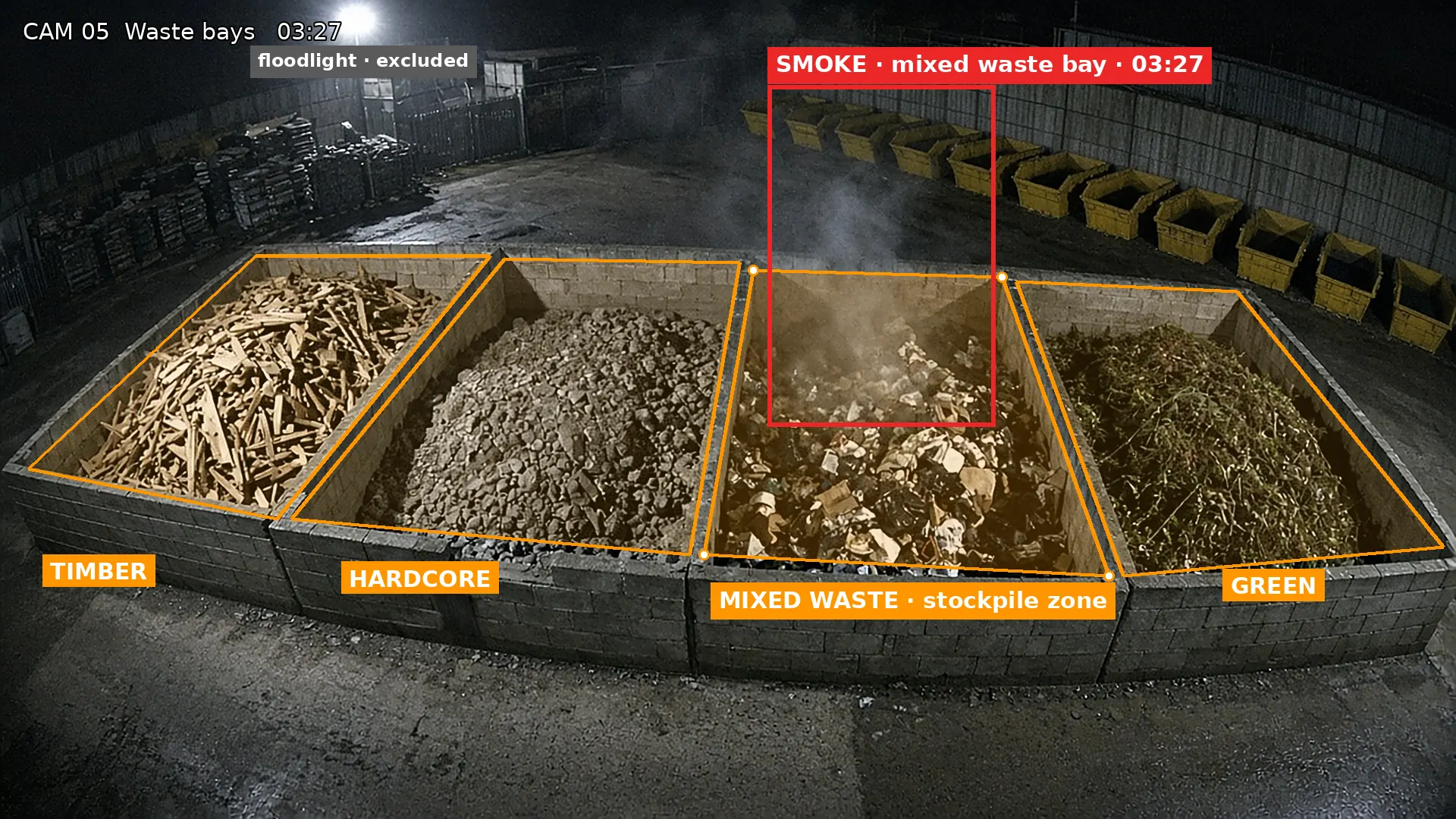
    Night CCTV: smoke rising from a mixed waste bay, boxed inside that bay's zoneMixed-materials alert
    Smoke from one waste bay at night.
    Worked scenarios

    Which method should lead on a waste yard, a warehouse or a vehicle yard?

    Thermal usually leads on large self-heating stockpiles, video AI on buildings and yards already covered by CCTV, and video AI with intrusion zones on vehicle yards. These are scenarios, not case studies. Each shows where one method naturally leads and what the others add.

    Waste yard

    A waste stockpile at night: thermal leads

    A recycling yard stores mixed waste in large piles. Fires in stockpiles can start deep inside and smoulder for hours, often overnight when the site is empty. Heat is the first sign, and it can build below the surface long before smoke appears. Thermal cameras aimed at the largest piles are the natural lead here, because heat building inside a pile can show as a warm patch on the surface that no ordinary camera can see. Regular temperature checks still matter, because no camera sees deep inside a pile.

    Video AI adds coverage of everything else on the yard: the tipping area, bale stores, vehicles and the boundary. When smoke does appear, the alert comes with a clip, so the duty manager can see at once whether it is a real fire or steam from a wet pile. A certified fire alarm still covers the buildings. The fire prevention plan checklist explains what the Environment Agency guidance expects for detection.

    Warehouse

    A warehouse: video AI leads

    A distribution warehouse already has dozens of CCTV cameras covering racking, loading bays and charging areas. Smoke from a pallet, a charging battery or a skip by the dock would be visible to those cameras. Video AI on the existing cameras gives wide coverage quickly, with no new hardware on most cameras, and can also flag people in the building out of hours.

    Thermal earns its place on specific risks, such as a battery charging bay or a hot process. On-camera analytics may already be switched on for door areas, and can stay as a simple extra. Indoors, the certified fire alarm remains the primary system; video AI adds a visual check and earlier warning where smoke is visible to a camera.

    Starting points
    Waste yard
    Piles that can self-heat, open bays, out-of-hours risk
    Thermal on the hottest piles, video AI across the yard
    Warehouse
    Racking, loading bays, indoor smoke
    Video AI on existing cameras, alongside the fire alarm
    Vehicle yard
    Fences, gates, parked vehicles after dark
    Video AI with polygon areas, line crossing and schedules
    Which method usually leads at each kind of site
    Vehicle yard

    A vehicle yard: intrusion first, then fire

    A depot parks vans and lorries overnight on a large fenced yard. The main worries are people climbing the fence and vehicle fires. Thermal cameras are strong on long, dark perimeters, because people and vehicles stand out by heat at distance. Video AI on the existing yard cameras can tell people and vehicles apart from weather and headlights, and sends a clip showing who is there, so someone can decide whether to call the police.

    The same cameras can watch for smoke from a parked vehicle. Alerts go to your phone. Alerts to a monitoring centre (ARC) and phone-call alerts are available as optional add-ons; see AI CCTV vs remote CCTV monitoring for how they combine. On-camera line crossing on the gate camera can stay as a basic layer.

    Decision guide

    How do I choose between video AI, thermal and on-camera analytics?

    Start with the first sign of trouble on your site: heat inside material points to thermal, while visible smoke, flame or a person points to video AI on the cameras that already see it. Work through these questions in order.

    1

    What is the first sign of trouble?

    If it is heat inside material or plant, put thermal on that spot. If it is visible smoke, flame or a person, video AI on the cameras that already see it is the faster start.

    2

    How much area do you need to cover?

    Video AI scales across every camera you already have. Thermal is usually targeted at the few areas where heat matters most.

    3

    What can your cameras see at night?

    Video AI needs a usable picture, from lighting or infrared. In very dark or long-range areas, thermal may be the better fit.

    4

    Who acts on an alert?

    An alert is only useful if someone sees it. Decide whether it goes to staff phones, a monitoring centre or a phone call, and check that the clip gives them enough to act.

    5

    What does your permit or insurer expect?

    Check your fire prevention plan, fire risk assessment and insurer. None of these methods replaces a certified fire alarm.

    Night CCTV of smoke from a pile of rubber conveyor belting offcuts, with an app alertVideo AI leads
    Night CCTV of smoke from a pile of rubber conveyor belting offcuts
    Who acts

    An alert someone can check

    Video AI sends the clip with the alert, so the person who gets it can see what happened and act. Alerts to a monitoring centre (ARC) and phone-call alerts are available as optional add-ons.

    Being fair

    When is a thermal camera the better choice?

    Thermal is the better choice where heat comes before anything visible, or where there is no light at all. Thermal imaging measures heat rather than light, which makes it the stronger tool in some situations.

    • Hidden hotspots in pilesHeat building inside a stockpile can show as a warm patch on the surface before any smoke or flame is visible. Neither camera type sees deep inside a pile, which is why the Environment Agency also expects regular temperature checks.
    • Pitch dark, no infraredThermal needs no light at all. Ordinary cameras need daylight, site lighting or infrared to see smoke.
    • Seeing through smokeThermal cameras can see heat through smoke, which helps show where a fire is once smoke has filled a building.
    • Temperature thresholdsRadiometric thermal cameras can alarm at a set temperature, which suits equipment, conveyors and battery storage.
    Night CCTV of very large open coal stockpiles on a port quay stretching into the distanceThermal leads
    Night CCTV of very large open coal stockpiles on a port quay stretching into the distance
    Layers

    Can video AI, thermal and on-camera analytics work together?

    Yes. Most sites end up with layers rather than a single winner. Each layer covers a gap in the others: the alarm meets the legal baseline, video AI gives wide visual coverage on cameras already installed, thermal watches the few places where heat comes first, and simple on-camera rules handle basic boundary events. The key is that alerts from every layer reach the same people, so nothing waits to be noticed.

    1

    Certified fire alarm

    The base layer every site keeps, designed to recognised standards.

    2

    Video AI on existing CCTV

    Wide coverage of smoke, flame and intruders across yards and buildings, with the clip sent to your phone. Alerts to a monitoring centre (ARC) and phone-call alerts are available as optional add-ons.

    3

    Thermal on the hottest risks

    Thermal cameras aimed at stockpiles, quarantine bays or plant where heat is the first sign.

    4

    On-camera analytics where it fits

    Basic line crossing on cameras that already support it, alongside the other layers.

    Sources: Environment Agency, Fire prevention plans: environmental permits, which lists smoke and heat detectors including temperature probes, CCTV visual flame detection, and spark, infrared and ultraviolet detection as appropriate automated systems. General thermal imaging behaviour is described in plain terms; performance varies by product and scene.

    Hardware and set-up

    What does each approach need on site?

    Video AI needs your existing cameras and a network connection; thermal needs new cameras, mounts and cabling; on-camera analytics need cameras that support the rules you want. That difference shapes how quickly each can start and how much of a site it covers.

    What goes on site

    Video AI

    1. Existing CCTV cameras, over ONVIF or RTSP
    2. Your recorder or a direct stream
    3. Edge server on site, or the Woodcock AI Cloud
    4. App alert with the clip, plus email

    Thermal

    1. New thermal cameras aimed at the surfaces to watch
    2. Mounts, power and cabling
    3. Controller, recorder or monitoring software
    4. Alarm output, wherever that system is set up to send it

    On-camera analytics

    1. Cameras whose models support the rules you need
    2. Rules set in each camera's own settings
    3. Recorder or video management software
    4. Event notification from that system
    Kit each approach adds to a typical yard, from camera to alert

    Video AI on existing CCTV

    Most sites already have cameras on poles and buildings covering yards, bays and boundaries. Video AI connects to those through an edge server on site or the Woodcock AI Cloud. You draw polygon detection areas that follow the exact shape of a pile, bay or fence line, add line crossing at gates and set a schedule for each camera. Models are hyperfitted to each scene and learn from feedback on alerts, so the system gets to know what normal looks like on every camera.

    Thermal cameras

    Thermal is new hardware: cameras positioned to see the surfaces you want to monitor, with mounts, power, cabling and temperature thresholds set for each scene. It earns its place where heat comes first, which is why many sites put thermal on the highest-risk piles or plant rather than everywhere, and use the cameras they already have for the rest.

    On-camera analytics

    If your cameras already support the rules you need, on-camera analytics can be switched on in each camera's settings. The trade-off is that capability, set-up and alert handling vary by model, and older cameras may not support them at all.

    Alerts

    How do alerts from each method reach your team?

    With Woodcock AI, alerts go by app, with the clip, and by email, with monitoring-centre (ARC) and phone-call alerts as optional add-ons. Thermal and on-camera alerts go wherever that system is set up to send them, often a recorder, monitoring software or a monitoring centre.

    Whichever methods you use, the aim is the same: every alert reaches the same people, with enough to check it. A clip showing visible smoke or a person at the fence lets someone decide whether to call the fire service, send a keyholder or stand down. If you already use guards or a monitoring service, see how AI CCTV and security guards work together.

    Rule of thumb
    Heat building inside material or plant
    Thermal camera or temperature probes
    Visible smoke or flame in a camera view
    Video AI on existing CCTV
    A person or vehicle where it should not be
    Video AI with polygon areas, line crossing and schedules
    A simple line on a camera that supports it
    On-camera analytics
    Any fire in an occupied building
    Your certified fire alarm, with the others as extra layers
    Match the earliest warning on your site to the method that sees it

    If your problem today is too many alerts rather than too few, start with AI CCTV vs motion detection alerts. If you run a permitted waste site, the fire prevention plan guide to thermal and AI CCTV explains how each method fits the detection section of your plan.

    Related comparisons

    Which comparison answers your question?

    Stay on this page if you are choosing detection technology. For a permitted site's fire prevention plan, a decision about guarding, or nuisance motion alerts, these pages go deeper.

    FAQ

    What else do people ask before choosing?

    Thermal, video AI and what each needs.

    Something else?office@woodcock.ai
    Is thermal better than video smoke detection?
    Neither is better for everything. Thermal cameras are better at heat: they see hotspots and fire in pitch dark or through smoke. Video smoke detection is better at seeing the smoke itself, which is often the first visible sign of a fire, and it can run on the cameras you already have. Many sites use both.
    Can I use both?
    Yes, and many sites do. A common approach is video AI on the existing cameras for wide coverage of smoke, flame and intruders, with thermal cameras pointed at the highest-risk spots, such as stockpiles or a battery quarantine bay.
    Do I need to replace my cameras?
    Not for video AI. Woodcock AI works with ONVIF or RTSP cameras and recorders, so you do not need to swap to fire-detection camera models. Thermal detection does need thermal cameras, and on-camera analytics needs cameras that support the apps you want.
    Which is best for waste sites?
    Waste sites usually benefit from layers: video AI across the yard and buildings to catch smoke and flame early, day and night, and thermal monitoring of stockpiles where heat can build below the surface. The Environment Agency fire prevention plan guidance lists smoke and heat detectors, CCTV visual flame detection and infrared detection among appropriate automated systems. For permitted sites, see fire prevention plans: thermal vs AI CCTV.
    Live test
    Pick 2–3 camerasChoose views that cover your main risks
    Set the areasPolygon detection areas and schedules for each one
    About a fortnightReal alerts by app, with the clip, and email
    Review togetherLook at what was caught and decide next steps
    How a fortnight on your own cameras works
    Which is better for intrusion at night?
    Thermal cameras pick out people and vehicles by heat in total darkness and over long distances, which suits large perimeters. Video AI on existing cameras uses the light or infrared the cameras already have, and sends a clip that shows who or what is there, in zones and on schedules you choose. Many sites use video AI on existing cameras and add thermal only for long, dark boundaries.
    Do any of these replace a certified fire alarm?
    No. Video AI, thermal cameras and on-camera analytics all add earlier warning and visual confirmation, but none of them replaces a certified fire detection and alarm system. Keep your fire alarm, and treat these as an extra layer.
    Can I see video AI working on my own cameras before choosing?

    Yes. A live test on your cameras connects 2–3 of your own cameras for about a fortnight, so you see real alerts from your own site before deciding where thermal or on-camera rules are also needed. You can also ask for an on-site demo, or book a site assessment.

    How are on-camera analytics different from video AI on a server?

    On-camera analytics run inside each camera, so what they can do depends on that model and its processing power, and each camera is set up on its own. Video AI runs on an edge server on site or in the cloud across all connected cameras, with polygon detection areas, line crossing, a schedule for each camera and models that learn each scene.

    Dusk CCTV of a paper mill yard with paper reels stacked under a canopy, zones marked
    Next step

    Not sure which mix fits your site?

    Book a site assessment: we look at your cameras and risks and suggest where video AI, thermal or both fit. Or see it first with a live test on 2–3 of your own cameras for about a fortnight.

    Dusk CCTV of a paper mill yard with paper reels stacked under a canopy

    For a wider buyer’s view, read best AI fire detection software in the UK.

    Comparing thermal, radar and other perimeter options? See our guide comparing perimeter intrusion detection options.

    Free site assessment