

Smoke and fire
Video smoke and flame detection over stockpiles, yards, plant and buildings, on cameras you already have.
Last reviewed
Short answer: choose the AI CCTV system that works with the cameras you already have, detects the specific events on your risk list, and proves it on your own site before you commit. Then compare how each option handles false alarms, the shape of its detection zones, whether it learns your site, privacy, support and the trial on offer. The 11-point checklist below, with a scorecard you can save, covers each question.
AI CCTV, also called video analytics, is software that watches camera pictures and raises an alert when it recognises something that matters, such as smoke, flame or a person in a yard at night. If the term is new, start with what is AI CCTV. If you already know you want it, these are the eleven questions that separate the options.
The list is vendor-neutral: the same questions we would want any buyer to ask, including of us. Each links to a section below, and the scorecard lets you score two systems side by side.
It should. Replacing working cameras is the most expensive way to add AI, and for most sites it is unnecessary. The right question is not whether a system is compatible in general, but which of your camera views are suitable for which detections.
Most IP cameras and network video recorders made in the last decade share their video using two open standards. ONVIF is the industry standard that lets equipment from different manufacturers find and talk to each other. RTSP is the streaming protocol that carries the live picture. AI software that connects over ONVIF or RTSP can usually work with cameras and recorders from a mix of brands. Older analogue cameras can often be brought in through an encoder or a hybrid recorder.
Compatibility is only the first step. A camera that streams perfectly may still be too far away, pointed at the wrong area, washed out by a floodlight or blocked by a stack of pallets. Ask any supplier to assess your cameras one by one, and to tell you which views support smoke and fire, intrusion or PPE detection before you sign anything.
Woodcock AI connects to existing cameras over ONVIF or RTSP, and every camera is checked in a free site assessment before anything is switched on. The guide for installers and resellers explains the same process from the installer's side.

There are two places the analysis can happen. Both work; the right one depends on your connection, your number of cameras and how your IT team likes to run things.
Edge processing means a small server on site analyses the camera streams locally. Video does not have to leave the site to be analysed, only the alerts and clips go out, and detection keeps working through a weak or interrupted internet connection. The trade-off is a box to house, power and keep secure.
Cloud processing means camera streams are sent to remote servers for analysis. There is nothing extra to install on site and the system is easy to scale, but it relies on a steady upload connection, which is worth checking on rural yards and temporary sites.
Be wary of a supplier who offers only one and insists it suits everyone. Woodcock AI offers both, an on-site edge server or the Woodcock AI Cloud, and the choice is made per site in the free site assessment. The picker further down this page gives a quick starting point.
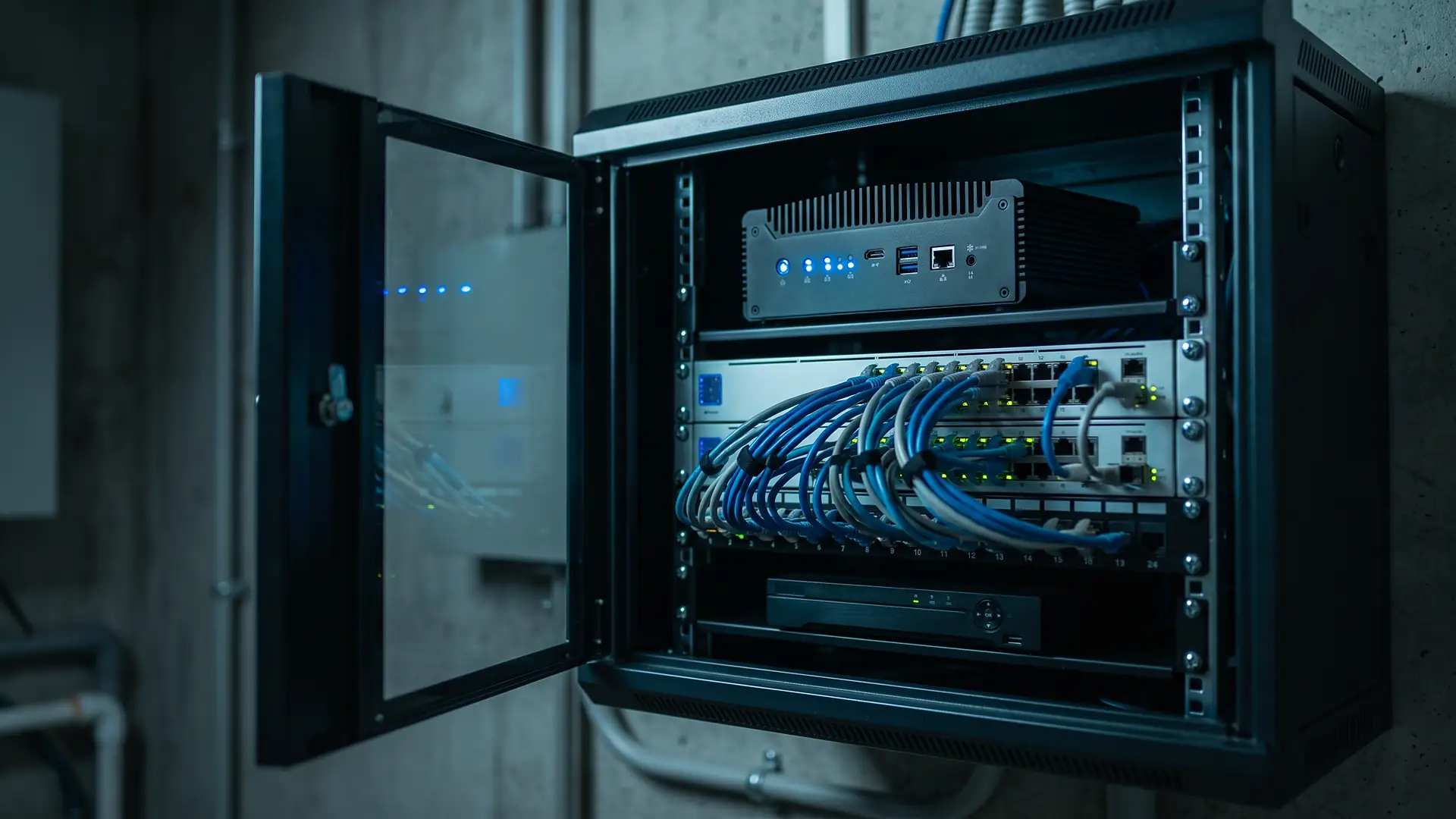
An edge server is a compact box that sits in the same cabinet as your network switch and recorder. It reads the camera streams over the local network and sends out only alerts and clips.
If the internet drops, analysis on site carries on. If space or power in the cabinet is tight, cloud processing may suit better.
Start from your risks, not from a feature list. A long list of detection types is less useful than a short list that works reliably on your cameras.
Write down the events that would hurt your business most: a fire starting in a stockpile overnight, a break-in at the compound, someone walking past plant without hi-vis. Then ask each supplier which of those events it detects, on which of your cameras, and what it needs to see to do so. Ask to see real footage of each detection, not only animations.
For fire, the buyer's question is often framed as finding the best AI fire detection software. Video smoke and flame detection works on cameras already watching your yard or building and can see smoke in open areas before it reaches a ceiling detector, if there is one at all. It is an extra layer alongside your fire alarm, fire prevention plan and any thermal cameras, not a replacement. The video AI vs thermal vs on-camera analytics comparison sets out where each fits.
Video smoke and flame detection over stockpiles, yards, plant and buildings, on cameras you already have.
People and vehicles in zones you draw, during the hours you set, with lines across gates and fence lines.
Hard hats and hi-vis vests or jackets, checked in the zones where your risk assessment calls for them.
Vehicle detection in yards and entrances, where supported on your cameras.
False alarms decide whether a system is still switched on in six months. If alerts arrive for every headlight and rain shower, people stop looking, and the one alert that matters gets missed.
Older video motion detection reacts to any change in the picture: swaying branches, rain, insects near an infrared lamp, shadows, headlights sweeping across a fence. AI detection is different because it recognises objects, such as a person, a vehicle, smoke or flame, and ignores the rest. Combined with zones and schedules, that removes most of the noise.
No system is perfect, so ask what happens when it gets something wrong. Can the person receiving the alert mark it as wrong? Does that feedback change anything for that camera, or does it disappear into a support queue? How are false alerts reviewed during the trial? A supplier that answers these questions clearly is one that expects to be measured.
The guide to reducing CCTV false alarms covers camera position, lighting and zone design in more depth.

Detection zones tell the system where a rule applies. Their shape matters more than most buyers expect, because real hazards are rarely rectangular.
Many camera systems and analytics products offer two tools: a rectangle and a line. A rectangle drawn round a row of stockpiles also takes in the apron in front of them, the loading shovel parked beside them and part of the building behind. Every one of those extra areas is a source of alerts you did not want.
Polygon detection zones let you draw a shape with as many corners as you need, following the edge of a stockpile, a walkway, a fence line or a compound. The rule applies inside the shape and nowhere else. One camera can carry several polygons, each with its own detection type and schedule, such as smoke and fire over the bays around the clock and intrusion on the apron out of hours.
Polygon zones are also a privacy tool. Drawing round the area you need, and leaving out neighbouring property, roads and welfare areas, is easier to justify in a DPIA than watching a whole view. Polygon zones are one of the clearest differences between Woodcock AI and many alternatives, so ask every supplier to show you how its zones are drawn.

A free site assessment reviews the cameras you already have, confirms which views are suitable and for which detections, and recommends edge or cloud processing for your site, before anything is switched on.
Every site looks different: different cladding, different lighting, steam from a vent, a flag that moves in the wind. A model trained only on other people's footage meets your site for the first time on day one.
Ask whether the system is tuned to each camera. Woodcock AI is self-learning: models are hyperfitted to each camera's own scene, so the camera over your loading yard learns that yard. The ordinary footage where nothing is wrong is used as positive training signal, teaching the model what normal looks like at that camera.
Because real fires are rare, Woodcock AI also synthesises training data, including smoke, and runs controlled smoke tests on site to confirm each camera can see what it needs to. Every alert has a feedback button; marking an alert correct or wrong feeds back into retraining for that camera.

“Was anyone at the north fence after midnight?”
“Extend the stockpile zone on camera 3 to cover the new bay.”
Finding a moment in recorded footage usually means scrubbing through hours of video. Plain-English search changes that.
With ask your cameras, you type a question the way you would ask a colleague, such as whether anyone was at the north fence after midnight, and Woodcock AI lists the matching clips to watch and download. It is useful after an incident, for an insurer's question or before a toolbox talk.
The same approach applies to the set-up itself. Instead of working through settings menus, you can describe a change to your detection design in plain English, such as extending a stockpile zone to cover a new bay, and review it before it goes live.
When comparing systems, ask whether search covers all cameras at once, how far back it goes, and whether design changes need a support ticket or can be made by you.
An alert is only useful if it reaches someone who can act on it, with enough information to decide what to do.
Ask how alerts arrive, and whether each one carries the clip. A short clip and a plain-English description of what the camera saw let the person receiving the alert judge it in moments, without logging in to a recorder.
Woodcock AI sends alerts by the app, with the clip, and by email, to the people you choose for each zone and shift. Alerts to a monitoring centre (ARC) and phone-call alerts are available as optional add-ons. Those add-ons suit sites that are empty at night or need a guaranteed response.
Then decide who responds. Name one person per zone and shift, plus a back-up, and agree what they do. The AI CCTV vs remote monitoring comparison and AI CCTV vs security guards explain how AI alerts fit alongside a monitoring centre or guards.
“Grey smoke rising from the middle bay, drifting towards the building.”
AI CCTV processes images of people, so UK GDPR and the Data Protection Act 2018 apply. The ICO expects a data protection impact assessment before processing that is likely to result in high risk, and AI analysis of CCTV often falls into that category.
A good supplier helps you write it. Ask whether it will help you describe the purpose of each detection, the zones and hours covered, how long clips are kept, who can see them and how a person reviews alerts before anyone acts. Ask where video is processed and stored, which is another reason the edge or cloud choice matters.
Be cautious of any supplier that describes its product as compliant on its own. Compliance depends on how you use the system: proportionate zones, clear signs and privacy information, sensible retention and human review. The AI CCTV and GDPR guide and the CCTV compliance hub cover the detail.
Most buyers end up choosing between four broad approaches. Products vary within each, so treat this as a map of the questions to ask, not a verdict on any one product.
| Approach | Existing cameras | Zone shapes | Learns your site | Footage search | Alerts and response | Install and support |
|---|---|---|---|---|---|---|
| On-camera analyticsbuilt into some cameras | Only cameras with the feature; mixed estates need matching models | Usually boxes and lines | Rarely: fixed models in the camera | Varies; often by event type only | Via the recorder or VMS you already use | Your installer, camera by camera |
| Generic cloud video AIsoftware as a service | Often, over ONVIF or RTSP | Varies; many offer boxes and lines | Varies: often one model for every customer | Varies by product | App or email, varies by product | Often self-install, remote support |
| Remote monitoring centrepeople watching | Yes, alongside their own alarm triggers | Depends on the triggers feeding it | Operators learn your site over time | Operators review on request | A person decides and calls out | Monitoring company, alongside your installer |
| Woodcock AIvideo AI on existing CCTV | Yes, over ONVIF or RTSP; suitability confirmed per camera | Polygon zones with as many corners as you need, plus lines | Yes: models fitted to each camera's scene, retrained from your feedback | Plain English: ask your cameras, and describe design changes | App with the clip, and email; ARC and phone-call alerts as add-ons | End to end: survey, design, supply, install, support 24/7 |
Swipe sideways to compare each approach.
For deeper comparisons, see the comparisons hub.
Software is only half the job. Someone has to survey the site, decide which cameras cover what, fix poor views, install any extra hardware, commission the system and look after it.
Ask who does each of those steps, and what happens when you have a problem at 3am on a Sunday. Systems sold as software only leave the design and camera work to you or your installer, which can work well if you have a strong installer, and less well if you do not.
Woodcock AI offers an end-to-end design, supply and install service: site survey, design, supply, installation, commissioning, go-live and ongoing support, with support available 24/7. If you already have a trusted installer, Woodcock AI works through installer and reseller partners too.

A trial on your own cameras, on your own site, is the most reliable test there is. Demonstrations on someone else's footage tell you what a system can do somewhere else.
Agree what good looks like first. Write down which cameras are included, which detections are being tested, who reviews the alerts and how you will judge the result, for example how many alerts needed action and how many were noise.
Cover the conditions that matter. Run long enough to include day and night, a spell of bad weather and both busy and quiet periods. For smoke detection, ask whether a controlled smoke test can be run on site.
Use the feedback. Mark alerts correct or wrong throughout. A system that learns your site should get better during the trial, and you should be able to see that it has.
Review honestly. At the end, look at missed events as well as false ones, check the DPIA still matches what you are doing, and decide which cameras to add. Woodcock AI trials start with the free site assessment.
Use the eleven questions to score up to two systems side by side. Yes scores two, Partly one and No nothing, for a maximum of 22. Your scores are saved in this browser, so you can come back after each supplier call.
Score each system Yes, Partly or No on every question. Scores are saved in this browser only, nothing is sent.
| Question to ask | System A | System B |
|---|---|---|
| 1. Works with your existing camerasWhy it matters | ||
| 2. Edge, cloud or bothWhy it matters | ||
| 3. The detections you needWhy it matters | ||
| 4. False-alarm handlingWhy it matters | ||
| 5. Polygon zones, not just boxes and linesWhy it matters | ||
| 6. Learns each siteWhy it matters | ||
| 7. Plain-English footage searchWhy it matters | ||
| 8. Alert channels that suit youWhy it matters | ||
| 9. GDPR and DPIA supportWhy it matters | ||
| 10. Install and supportWhy it matters | ||
| 11. A proper trialWhy it matters |
Answer four quick questions for a suggested starting set-up. It is a starting point for a conversation, not a design: the free site assessment confirms what each of your cameras can do.
There is no single best system for every site. The best AI CCTV system for you is the one that works with your existing cameras, detects the events on your risk list, keeps false alarms low on your views, and comes with a proper trial and support. Use the 11-point checklist on this page to compare the options side by side.
Usually, yes. Most modern IP cameras and recorders share their video over ONVIF or RTSP, which is what AI software connects to. Older analogue systems may need an encoder. Ask any supplier to confirm, camera by camera, which views are suitable before you commit; Woodcock AI does this in a free site assessment.
Neither is better everywhere. Edge processing runs on a box on site, so it keeps working through a weak internet connection and sends out only alerts and clips. Cloud processing needs nothing extra on site but relies on the connection. Woodcock AI offers both, an on-site edge server or the Woodcock AI Cloud, chosen per site.
At minimum: compatibility with your existing cameras, edge or cloud processing, the detections you need, false-alarm handling, the shape of detection zones, whether the system learns your site, footage search, alert channels, GDPR and DPIA support, install and support, and a trial on your own site.
Look for video smoke and flame detection that runs on cameras already watching your stockpiles, yards or buildings, uses detection zones drawn round the areas at risk, sends alerts with the clip, and is tested on your own site. Treat it as an extra layer alongside your fire alarm, fire prevention plan and any thermal cameras, not a replacement.
Real hazards are rarely rectangular. A polygon follows the edge of a stockpile, a walkway or a fence line, so the rule applies only where you need it. A rectangle takes in roads, neighbouring buildings and plant, which adds alerts you did not want.
Good systems recognise objects such as people, vehicles, smoke and flame rather than reacting to any pixel change, and only alert inside the zones and hours you set. The strongest also learn from each site, using feedback on wrong alerts to retrain the model for that camera.
The ICO expects a data protection impact assessment before processing that is likely to result in high risk, and AI analysis of CCTV often falls into that category. In practice, complete one before you switch AI detection on, and choose a supplier that helps you describe zones, retention and human review.
Long enough to cover the conditions that matter on your site: day and night, a spell of bad weather, and the busy and quiet periods of your week. Agree up front what a good result looks like, which cameras are included and who reviews the alerts.
Alerts go out by the Woodcock AI app, with the clip, and by email, to the people you choose for each zone and shift. Alerts to a monitoring centre (ARC) and phone-call alerts are available as optional add-ons.

A free site assessment reviews the cameras you already have, confirms which views suit smoke, fire, intrusion and PPE detection, recommends edge or cloud processing, and sets up a trial you can judge for yourself. Alerts to a monitoring centre (ARC) and phone-call alerts are available as optional add-ons.
Want us to check your site against this?