

How to set up smoke detection areas in Woodcock
Add a camera, draw a smoke detection area around the yard, switch on the Smoke class, set a schedule and check your first alert. 2 min 5 s.
Video transcript
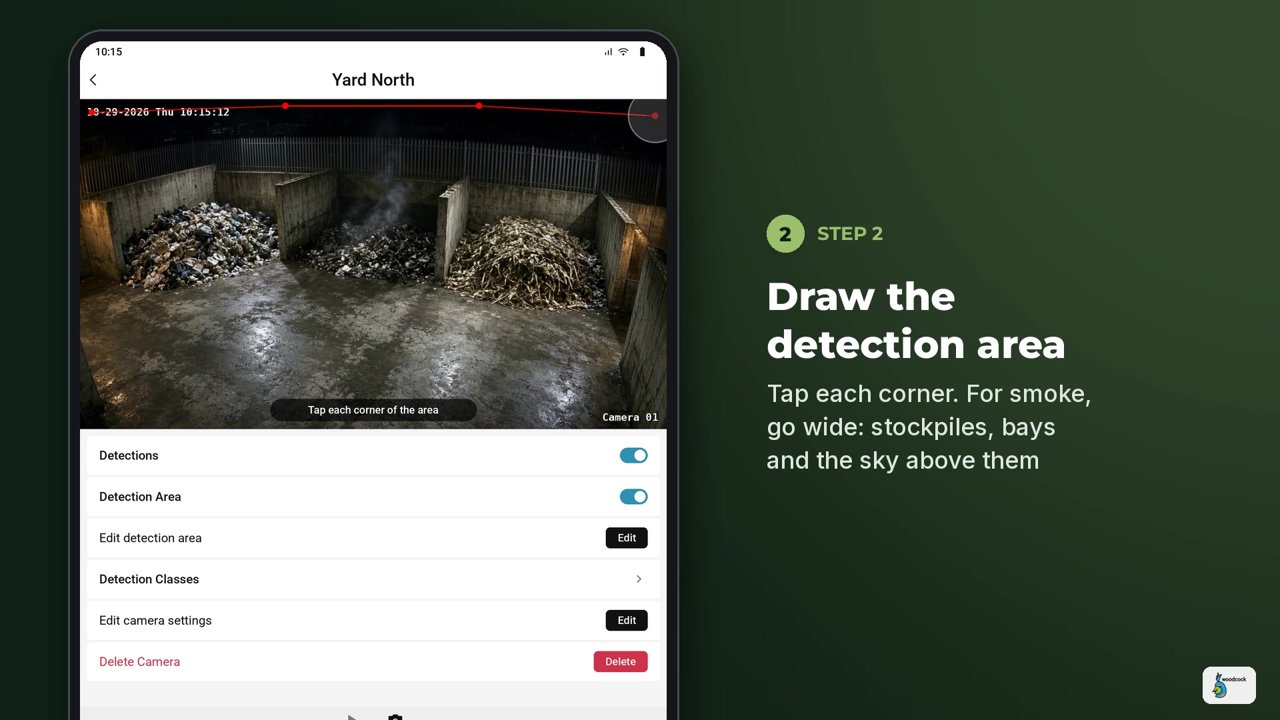
How to set up smoke detection areas in Woodcock. In this guide, we'll add a camera, draw a detection area around the whole yard, choose what to detect, set a schedule, and check your first alert. Step one, open the Woodcock app. Your cameras appear in a live grid. Tap the plus button to add a camera. Give it a clear name, like Yard North. Then enter the camera's RTSP address, username and password and tap add. Or choose add automatically, tap refresh and pick the camera from the RTSP device list. Step two. Open the camera, make sure detections is switched on, then go to detection area and tap edit. Tap each corner of the area you want to watch. For smoke go wide. Take the zone around the whole yard, including the stockpiles, the bays and the sky just above them, because smoke rises before it spreads. Step three. Open detection classes and switch on smoke. For each class you can also turn on descriptions and notifications. Step four. Set a schedule. Tap Edit, choose a start time and an end time and tap Save. Step five. When smoke appears, the latest self-learning segmentation-based AI picks out the true shape of the plume, frame by frame, and separates it from steam, dust and headlights. A notification drops down with a short description of what it saw. Tap it for a snapshot recording of the latest event in under four seconds. From there, you can download the clip, or share it. Every event also lands on the camera's timeline, so you can scroll back through the day. Woodcock works alongside certified fire alarms. It doesn't replace them. Want to see it on your own site? Book a live test on two or three of your cameras, or an on-site demo, at woodcock.ai.