

Health and safety risk assessment for business
A health and safety risk assessment lists the hazards on your site, scores how likely and how serious each one is, and records a control for each. Use our free online tool or template to cover fire, PPE, slips and trips, machinery, vehicles, work at height, manual handling, hazardous substances, access, housekeeping and emergency routes. Where a camera can help, Woodcock AI adds smoke, flame, zone intrusion, line-crossing, PPE and vehicle detection to the CCTV you already have.

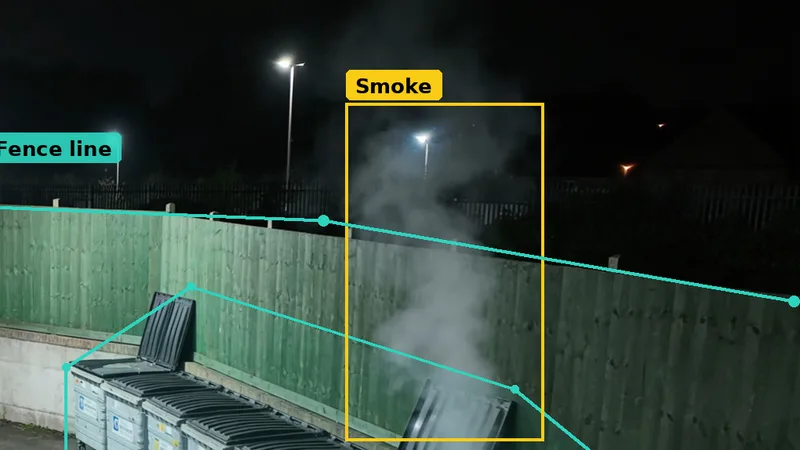
Last updated 30 October 2026. A good risk assessment covers every significant hazard on site, not just fire. Most of those hazards are controlled by people and process: guarding, inspections, training, permits and good housekeeping. A few can also be watched by the CCTV you already have. This page helps you do both: score the whole site, then see which hazards a camera can help with and which need other controls.
Watch the video: a quick walkthrough
The video gives a good explanation of how the tool works, from naming your site to downloading your results, in under two minutes.
It is free, takes a few minutes and your answers stay on this device.
Edited transcript — Walkthrough of the online health and safety risk assessment tool
Edited for clarity: ppe narrowed explicitly to hard hats and hi-vis; removed timing language and corrected agreement. Timings refer to the original film.
Here's a really handy tool and we hope you enjoy it. It's a free health and safety risk assessment that you can complete in your browser in five simple steps.
Start with your site, give it a name, choose the site type, then pick the areas you have, such as the yard, the loading bay and the bin store.
Select add suggested hazards and the tool builds a starting list for each area covering fire and smoke, PPE, vehicles and pedestrians, slips and trips, machinery and maintenance and more.
On the hazard step, score each one for likelihood and severity from one to five. The score and risk level update as you work and you can add your own hazards too.
The live dashboard fills in as you go with a heat map, a count for each risk level and your top risks.
Next, choose a control for each hazard. Where cameras can help, the tool suggests one such as smoke and flame detection, zone intrusion, line crossing, PPE detection for hard hats and hi-vis, or vehicles in a zone. Everything else gets a non-camera measure like inspections, training or maintenance logs.
Then add your details. We'll email you a copy of your assessment and send one to our team before showing your full results.
Your results show every hazard scored and controlled. Download the full spreadsheet with your register, dashboard and printable report or print it as a PDF.
Want to see which of these risks your existing cameras could watch? Book a site assessment with Woodcock AI.
Key moments
Free, no sign-up to start. Your answers stay on this device.
Start your health and safety risk assessment
Yes. Work through your site area by area across every health and safety hazard, score each one, pick a control and watch the heat map fill in. Your answers stay on this device until you download them or send them to us. Prefer a spreadsheet? Download the template (.xlsx).
The online tool needs JavaScript. Download the template instead: it has the same register, scoring bands and dashboard.
Download the template (.xlsx)Score your site in five steps
Saves on this device as you goAbout your site
Hazards
Controls
Woodcock AI detects smoke, flame, zone intrusion, line crossing, PPE and vehicles in a zone. Everything else is controlled by inspections, training, permits and maintenance logs, so add those measures for every hazard.
Your assessment
What should a health and safety risk assessment cover?
Walk the site area by area and think about who could be harmed and how. For most industrial, logistics, waste and construction sites the list includes:
- Fire and smoke: bin stores, waste bays, battery charging, hot work and outdoor stock.
- PPE: areas where head protection, hi-vis or other equipment is required.
- Slips, trips and injuries: spills, uneven floors, trailing cables, poor lighting.
- Machinery and maintenance: guarding, isolation and lock-out, and inspection schedules.
- Vehicles and pedestrians: yards, loading docks and shared routes.
- Work at height: racking, mezzanines, roofs, ladders and vehicle loading.
- Manual handling: lifting, carrying, pushing and repetitive tasks.
- Hazardous substances and storage: fuel, gas cylinders, chemicals, bunding and spill kits.
- Unauthorised access and lone working: people entering restricted areas, and staff working alone out of hours.
- Housekeeping: waste build-up, blocked aisles and stacking.
- Emergency routes: fire exits, assembly points and clear escape routes.
Score each one for likelihood and severity, record the controls you already have, and decide what more is needed. The HSE’s guidance on managing risks and risk assessment at work sets out the basic steps.
Why is standard CCTV not enough?
Recorded CCTV tells you what happened. It does not tell anyone while it is happening. Monitoring every camera live is costly and tiring, and people miss things on quiet screens. So hazards such as fire after hours, people in restricted areas and vehicles where people walk tend to be found late.
AI detection watches each camera view for specific events and sends an alert when one happens. Woodcock AI connects to your existing cameras or recorder over ONVIF or RTSP and works with the major camera brands, so the cameras you already own can start doing that work. Our how it works page explains the setup.
What can Woodcock AI detect, and what can it not?
Woodcock AI detects six things on your existing cameras: smoke, flame, zone intrusion, line crossing, PPE (hard hats & hi-vis) and vehicles in a zone. Every other hazard on this page is handled by non-camera controls such as inspections, training, permits, maintenance logs and supervision. It does not detect falls, injuries, machinery faults or crowd levels, so the tool never offers a camera control for those.
How are camera detections set up for each hazard?
- Polygon detection zones. Draw the bin store, walkway or PPE area as a shape on the camera view. Only events inside it count.
- Line crossing. Draw a virtual line across a gate or fence and choose the direction that matters.
- Time schedules. Run intrusion alerts only when the site is closed, or PPE checks only during shifts.
- Per-area rules. Each zone gets its own detection type and alert settings, so a yard camera can watch a walkway for vehicles and a bin store for smoke.
- Self-learning on your footage. Each camera’s model is fitted to its own view, which cuts false alerts from shadows, rain and headlights.
- Alerts. By app with a short clip, and by email. Alarm receiving centre (ARC) and phone alerts are optional add-ons.
How do you use the risk assessment template?
Our free spreadsheet template is a working register with five sheets: How to use, Site details, Risk Register, Dashboard and Printable Report. For each hazard you pick a category and a hazard from the library, score likelihood and severity from 1 to 5, and record existing controls, any AI camera control and the non-camera controls. The score, band and residual risk fill in automatically.
- Hazard categories: fire and smoke, PPE, slips, trips and injuries, machinery and maintenance, vehicles and pedestrians, work at height, manual handling, hazardous substances and storage, unauthorised access and lone working, housekeeping, and emergency routes.
- AI camera controls: smoke detection, flame detection, zone intrusion, line crossing, PPE (head protection and hi-vis) and vehicles in a zone. Everything else goes in the non-camera controls column.
- Actions: owner, due date and status for each row, with ten example rows you can overwrite.
- Dashboard: a 5x5 heat map, counts by band and your top five risks. The report sheet prints on A4 landscape.
Which risks can your cameras help with?
These five examples show where a camera can help and where it cannot. Choose one to see how it works; with JavaScript off, all five are shown.
Which risk are you looking at?
Bin stores, waste bays, plant rooms, battery charging areas and outdoor stock can start to smoke when nobody is near. A smoke or flame zone on each one sends an alert with a clip to the keyholder, day and night. It adds to your fire alarm and fire risk assessment; it does not replace them.
AI smoke and flame detection
Gates, fence lines, roofs and restricted stores are risks out of hours. Draw an intrusion zone on the store or a line across the gate, and set a schedule so alerts only run when the site is closed.
Intrusion and line-crossing
Loading docks and yards mix lorries and people on foot. Vehicle detection in a drawn pedestrian walkway zone alerts when a vehicle enters an area it should not, so you can review the clip and tighten the traffic plan.
Vehicle detection in a zone
Mark the areas where your risk assessment requires head protection and high-visibility clothing. PPE (hard hats & hi-vis) detection checks those zones and keeps a clip of each alert for supervisors and toolbox talks.
PPE detection
Not every hazard suits camera detection. Score slips and trips, work at height, manual handling, machinery, hazardous substances, housekeeping and emergency routes too, and control them with inspections, training, permits, maintenance logs and supervision.
Non-camera controls
Each detection runs inside zones you draw on the camera view. Read more about polygon detection zones, intrusion detection, line-crossing and vehicle detection.
How does PPE detection fit a risk assessment?
Where your assessment says head protection and high-visibility clothing are required, mark those areas as PPE zones. Woodcock AI’s PPE (hard hats & hi-vis) detection checks people in the zone and records an alert with a clip. Use the clips for supervision and briefings, not as a substitute for them. See PPE detection.
What are the steps from assessment to alerts?
- 1List and score hazards in the template, area by area.
- 2Choose controls. Mark which hazards a camera can watch and which need other measures.
- 3Book a site assessment. We check your cameras, views and network against your list.
- 4Live test on your cameras. We connect two or three of them so you see real alerts on your own site.
- 5Go live and review. Alerts go by app and email; alarm receiving centre (ARC) and call alerts are optional add-ons.
Is upgrading easier than expected?
- Use your existing cameras. Most IP cameras and recorders connect over ONVIF or RTSP.
- No disruption to your maintainer. Your CCTV installer keeps looking after the cameras.
- Learns your site. Each camera’s model is fitted to its own view. See self-learning AI.
- Little new hardware. Extra cameras are suggested only where your views leave gaps.
Coming soon, early 2027: ask your cameras questions about what they have seen. For waste sites, our waste site fire risk assessment guide goes deeper on fire.
Ready to put your risk assessment to work?
Score your site online or with the template, then book a site assessment. We will look at your cameras and show which of your hazards they can watch.
Related pages
Frequently asked questions
What should a health and safety risk assessment include?
The hazards in each area of your site, who could be harmed, a likelihood and severity score, the controls already in place and any further action. Typical hazards include fire, PPE, slips and trips, machinery, vehicles, work at height, manual handling, hazardous substances, access, housekeeping and emergency routes.
Is the risk assessment tool free?
Yes. Use the online tool on this page or download the Excel template. Both score likelihood and severity from 1 to 5, band each risk from low to critical and record a control.
Which hazards can AI CCTV detect?
Woodcock AI detects smoke, flame, zone intrusion, line crossing, PPE (head protection and hi-vis) and vehicles in a zone. Other hazards, such as manual handling, work at height or machinery maintenance, need non-camera controls like training, permits, inspections and maintenance logs.
Does AI CCTV replace a fire risk assessment or fire alarm?
No. Camera smoke and fire detection adds an early warning that watches areas outdoors and out of hours. Your fire risk assessment and certified fire alarm stay in place.
Do I need new cameras?
Usually not. Woodcock AI connects to existing cameras and recorders over ONVIF or RTSP and works with the major brands. A site assessment shows whether any views need adding.
How are alerts sent?
By app, with a clip, and by email. Alarm receiving centre (ARC) and phone alerts are available as optional add-ons.
Last reviewed 30 October 2026