

What is AI CCTV?
Software analyses camera video for selected objects or events and raises alerts for people to review. Woodcock AI adds this layer to compatible CCTV rather than merely recording footage.
AI CCTV · Product overview
AI CCTV uses software to analyse camera video for selected objects or events and raise alerts for review. Woodcock AI adds smoke and fire, human/intrusion, vehicle and PPE detection to RTSP or ONVIF cameras. Detection runs on an edge server or in the cloud, with suitability assessed for each camera view.
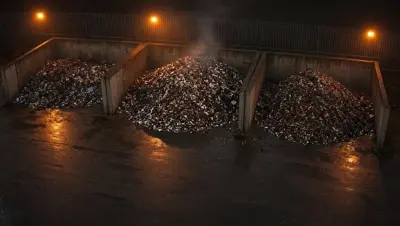 Smoke & fire
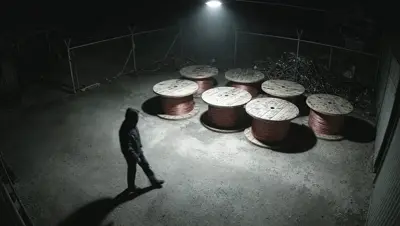 Intrusion
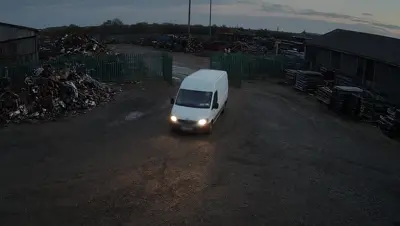 Vehicles
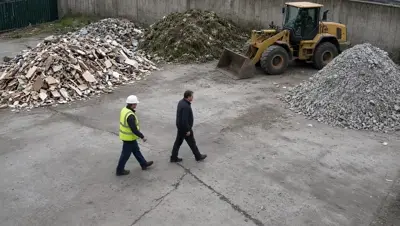 Hi-vis & hard hats
Choose the view firstAssess angle, lighting and obstructions for each detection.
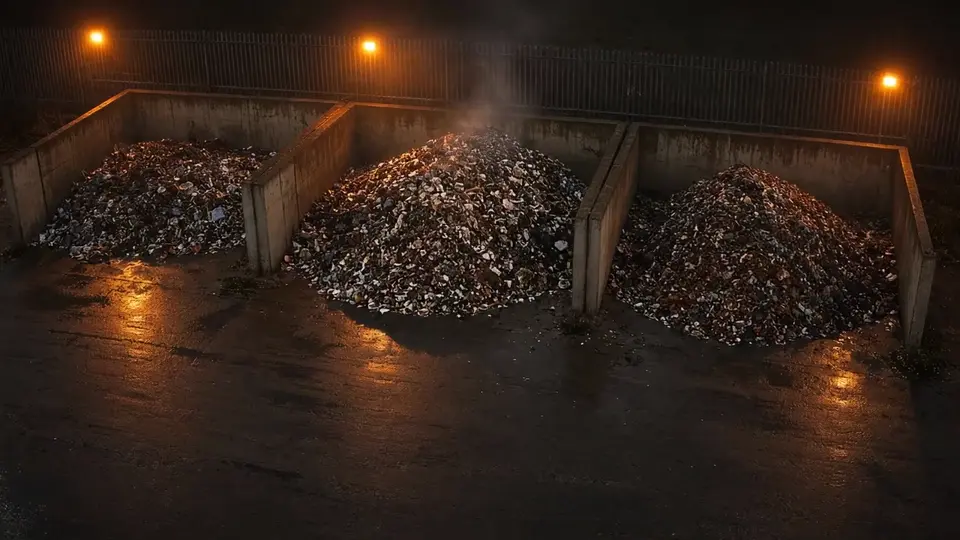 DEMONSTRATION CLIP
Flames visible at the stockpile after dark.
Example snapshots
Fire alert · exampleStockpile viewPhone layout is a product visualisation. Generated CCTV-style scenes are not customer footage, a current app screenshot or measured detection results. Alerts need human review.

Recording and detection do different jobs. A recording lets someone look back; an analysis layer looks for selected events and brings them to a reviewer’s attention. Woodcock AI is designed for business operators who want to make more use of camera views they already have, rather than start with a replacement camera bundle. For the wider category background, read what AI CCTV means.
| Detection | What to assess |
|---|---|
| Visible smoke and fire | Whether signs of smoke or flame can be seen in the intended area, including changing light and obstructions. |
| Humans and intrusion | The people, access area and hours that matter for that particular view. |
| Vehicles | The vehicle area, approach and usable detail; a view must cover the intended event. |
| PPE: hi-vis and hard hats | Whether those items are visible at the camera’s angle and distance. |
These are Woodcock AI’s supported detection categories, not a promise that every connected camera suits every category. Select the relevant detection modules for each view and agree who will review the resulting alerts. Coverage, conditions and human response remain part of the decision.
A gate, stockpile or loading apron rarely follows a neat rectangle. Polygon detection areas are drawn manually on the camera picture to follow the part of the site that matters. An irregular yard boundary can include the working area while excluding the public road from that detection area. This focuses the configured detection; it does not remove the road from recorded footage.
Polygon detection zones are not privacy masking. Recording and privacy responsibilities need their own assessment. A boundary also cannot make a hidden object visible: parked equipment, a closed door or a changed stack can still obstruct the view.
Per-camera schedules let the site configure different active alert hours. A gate may need intrusion alerts after closing, while another camera has smoke and fire detection scheduled throughout operating and closed hours. Those settings are agreed and tested rather than assumed to fit every part of a business.
Picture-lock review · captions · no voiceover yet. Page-specific demonstration material, not a record of a customer installation or measured performance.
Captions and the HTML transcript provide the prepared narration while voiceover is pending. Detection areas do not mask recordings; assess every view and keep human review in place.
This is an ordinary CCTV camera, already on the wall. Woodcock AI turns cameras like it into detectors. When a vehicle comes through the gate after hours, you get an alert with the clip and a short description of what was seen.
You draw a polygon detection area around what matters, here, the cable drums, and alerts only come from inside it. When someone walks in, you get a person alert from that area.
Each camera gets its own schedule. Watch the gate after hours, and run smoke and fire detection around the clock. From any alert, download the clip, or share it with your team.
Detection runs on an edge server on site, or in the Woodcock AI Cloud. Either way, alerts to your phone need a connection, and a 4G router can provide one.
For site safety, Woodcock AI can check for hi-vis and hard hats, and flag someone in the yard without them.
To see it on your own site, we can run a live test on two or three of your cameras for about a fortnight, where they're suitable, or arrange an on-site demo or a site assessment. It works alongside certified fire alarms and other required safety systems, never instead of them. Find out more at woodcock.ai.
Woodcock AI has years of development behind it and is now in market with real-site use and traction. Its self-learning approach uses site feedback in retraining. Reviewing whether alerts are relevant helps the system fit the scene; it is not a claim that software becomes error-free or learns every new risk unaided.
Ask reviewers to retain the context of relevant, false and missed events. A moved camera or changed layout may call for a fresh view assessment and commissioning checks as well as feedback. People still decide what an alert means and act through the site’s response arrangements.

Detection runs on an edge server or in the cloud. This is a choice about where video is analysed, not a claim that every supplied camera contains Woodcock AI processing. Local analysis and remote alert delivery have different dependencies.
| Option | Practical considerations |
|---|---|
| Edge server | Analysis on site needs suitable local hardware, power and network access. Remote notifications still need connectivity. |
| Cloud | Analysis off site needs a suitable connection for the camera streams. Assess upload capacity and operating requirements. |
| Choosing for your site | Review the existing network, camera access, operational needs and any hardware work before selecting the approach. |
Neither choice removes the need to check what happens when a connection or local service is unavailable. The camera compatibility and processing guide explains the connection-to-alert pipeline without assuming a universal network requirement.
Woodcock AI connects to RTSP or ONVIF cameras, but stream access is only the first check. Assess the camera’s angle, detail, night picture, lighting and obstructions against the event you want it to detect. A connection that works is not evidence that a distant or obstructed risk can be analysed reliably.
Where coverage is missing, pre-configured Hikvision ColorVu turret or bullet cameras can be supplied as part of the assessed scope. The business-site CCTV installation service can reuse suitable cameras and design, supply and install additional coverage where needed. Woodcock AI is sold directly and through installers; your current installer can stay involved.
Begin with an assessment, select suitable views and events, then agree test conditions, recipients and human reviewers. A live test on your cameras connects 2–3 prospect cameras for about a fortnight, subject to suitability. An on-site demo is another way to explore the fit before a wider rollout.
Use the buyer checklist to compare systems and the approach comparisons to frame your questions. Judge relevance under your own site conditions, not a demonstration’s appearance. For a written scope, request a site-specific installation quote.
Software analyses camera video for selected objects or events and raises alerts for people to review. Woodcock AI adds this layer to compatible CCTV rather than merely recording footage.
Woodcock AI works with cameras providing RTSP or ONVIF access. Each view, lighting, stream access and intended detection is assessed before suitability is confirmed.
Smoke and fire, humans/intrusion, vehicles and PPE limited to hi-vis and hard hats. Detections and alert schedules are selected for the site and camera views.
Detection runs on an edge server or in the cloud. The assessment considers the site network, connection and operational requirements.
No system should be assumed error-free. Polygon areas, schedules and feedback-led retraining help focus alerts; judge relevance in the conditions on your own site.
No. It adds visual warning and human review alongside certified detection and all required safety systems, protections and procedures.
Request an on-site demo or a live test on your cameras. Subject to suitability, a live test connects 2–3 of your cameras for about a fortnight, with agreed events and reviewers.
Ask your cameras is Coming soon, early 2027 and is not available now. Current written alert descriptions are separate from future footage search.
Woodcock AI adds visual warning and human review. It does not replace alarms, sprinklers, extinguishers, doors, signage, training or certified detection. Remote notifications still need connectivity.
Book a site assessment or request an on-site demo. A live test on 2–3 prospect cameras for about a fortnight is subject to suitability, with agreed events, conditions and reviewers.