

Self-storage security: know someone is in the lanes tonight, not when a tenant calls
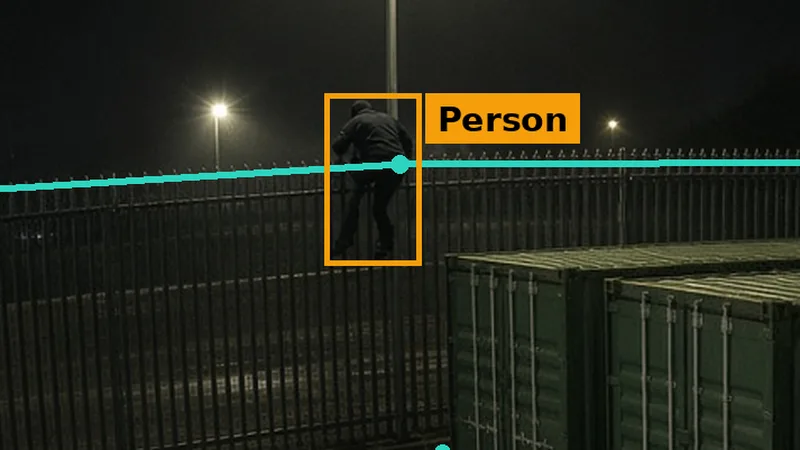
Self-storage security after hours means knowing when someone is on site who should not be. Most UK stores already have cameras: SSA UK’s 2026 report found 90.8% use monitored CCTV. But many sites are unmanned at night, and container sites especially: the CSTA’s 2026 census found 73% of container operating models are unmanned or only sometimes manned. AI detection on existing CCTV flags a person crossing the fence, a vehicle in the lanes after access hours, or smoke from a unit, and sends the clip to the app and by email.

Last updated 31 October 2026. A self-storage site holds other people’s belongings: furniture from a house move, a tradesperson’s tools, a small business’s stock, a family’s boxes of papers and photographs. Customers come and go with a keypad code or an app, often without speaking to anyone, and when access hours end the site is usually left to its fence, its lights and its cameras. This guide covers what the industry figures show, why storage sites are targeted after hours, where cameras should watch, how access-hours schedules work, how to spot a fire in a unit early, what data protection means for tenants on camera, and how AI detection on the cameras you already have turns recordings into alerts while there is still time to act.
How big is UK self storage, and how is it protected?
The Self Storage Association UK (SSA UK) publishes an annual report on the industry with Cushman & Wakefield. Its 2026 report counts 3,143 self storage stores across the UK. Cameras are already the norm: 90.8% of stores use monitored CCTV. And stores are run lean, with an average of 2.6 staff per store.
Two other figures in the report explain why so much of the work happens without anyone on site. 94.2% of operators offer online booking, so a customer can find a unit, pay and get an access code without visiting the office. And 76% of use is domestic, so most customers are individuals who visit occasionally and expect to let themselves in.
Container storage, where units are steel shipping containers in an open yard, is growing fastest. SSA UK reports that container storage makes up 40% of new store openings. The Container Self Storage Association (CSTA) runs its own census of that part of the market.
Why are container storage sites at particular risk?
The CSTA Container Self-Storage Census 2026, published on 25 June 2026, counted 1,218 container sites and 112,150 containers at the end of 2025, run by 684 operators. Business customers make up 46% of the customer base, which means many containers hold tools, equipment and stock. The census says the sector is investing in security, digital access and automation.
The figure that matters most for security is this one: 73% of container operating models are unmanned or only sometimes manned. On most container sites there is nobody on the premises for most of the day, and certainly not at night. That is efficient, and customers like the freedom to come and go. But it means the only things standing between an intruder and the containers are the fence, the gate, the locks and whatever the cameras can tell someone.
Container yards also have a layout that helps intruders. Long rows of steel boxes create lanes that cannot be seen from the road or from a single point. Rows often back onto the perimeter fence. And because the units are outdoors, a person with a vehicle can work at a door in the dark, out of sight, with a fair chance of not being noticed until a tenant visits.
Why are storage sites targeted after hours?
Storage sites are attractive for the same reasons people use them. They concentrate a lot of valuable property in one place. Tools, bikes, electronics, stock and furniture can all be resold. Individual units are often secured only by the tenant’s own padlock. And in the evenings and overnight there is usually nobody around.
- Nobody on site. Unmanned sites rely on cameras, alarms and the occasional visit, so an intruder may have hours before anyone looks.
- Rows that hide people. Container lanes and indoor corridors give cover from the road and the office.
- Self-service access. Keypads and apps are convenient, but codes can be shared, gates can be tailgated, and a customer who stays past closing looks much like an intruder on a recording.
- Mixed contents. Operators do not see what goes into every unit, which matters for theft and for fire.
- Long fences. Large yards on industrial estates often have long boundaries, backing onto waste ground, railway lines or other empty sites.
None of this is a reason not to run an unmanned site. It is a reason to make sure that, when something happens out of hours, someone finds out at the time rather than the next morning. Our commercial burglary prevention guide and out-of-hours site security checklist cover the wider picture.
What should a storage site’s security include?
Good security on a storage site works in layers. Each layer does a different job, and each depends on the others.
- A fence and gate. A continuous perimeter, kept in repair, with a gate that closes and locks at the end of access hours.
- Access control. Personal codes or app access for each tenant, a log of who came in and when, and access hours that match how the site is run.
- Lighting. Lanes, doors and corridors lit well enough that cameras can see, and anyone on site can be seen.
- Locks. Good-quality locks on every unit, and a clear policy on who supplies them.
- Cameras. Coverage of the gate, the fence, every lane and corridor, and the office, recording day and night.
- Alerts. Something that tells a person, at the time, that someone is in a lane, over the fence or through the gate when they should not be.
Most UK stores already have the first five. The SSA UK figure of 90.8% using monitored CCTV shows how normal cameras are. The question is how much of that footage anyone sees at night, across every camera, on every site.
What does AI add to CCTV you already have?
Ordinary CCTV records. Footage is usually looked at after a tenant reports a problem, which can be days later. Monitoring helps, but a person watching dozens of feeds at three in the morning cannot see everything. Woodcock AI watches the feeds from the cameras a site already has, and raises an alert when something that matters happens.
- Intrusion detection. Flags a person in a zone you draw, such as a container lane or an indoor corridor, during the hours you choose. See intrusion detection.
- Line crossing. Flags a person or vehicle crossing a line you draw, such as the top of the perimeter fence or the drive inside the gate. See line-crossing detection.
- Vehicle detection in zones. Flags a vehicle entering or stopping in a zone, such as a lane between container rows, after access hours. It is not number plate recognition. See vehicle detection.
- Smoke and fire detection. Flags visible smoke and flame, such as smoke from a container door seam or from under a roller shutter. See smoke and fire detection.
- Polygon zones and schedules. You draw each zone to fit the area, such as one lane but not the road beyond the fence, and set when it is armed. See polygon detection zones.
- Self-learning. The system learns from feedback on alerts at your site, so it gets better at telling real events from things that are not, such as foxes, headlights on the road or rain. See self-learning AI.
Each alert goes to the app with a snapshot and a short clip, and by email, so the site manager, the area manager, a keyholder or a monitoring company can see what is happening and decide what to do. Detection runs on an edge server on site or on a cloud server, and connects to IP cameras and recorders over RTSP or ONVIF, including Hikvision. Woodcock AI detects people and vehicles; it does not identify who anyone is. You will also soon be able to ask your cameras questions about what happened on site; Ask your cameras is coming soon, early 2027.
For an operator with several sites, the value is consistency. Every camera on every site is watched every night in the same way, and people are only called on when something actually happens.
Where should cameras watch on a storage site?
Start with the routes people take onto the site and the places they would work unseen once they are there. On most storage sites that means the gate and drive, the perimeter fence, the lanes between container rows, the indoor corridors and the office. The picker below shows what each one looks like at night, and what detection to put on it.
Which part of your storage site worries you most?
The lanes between container rows are the heart of a container storage site, and the hardest part to see from the road or the office. Once the gate has closed for the night, nobody has a reason to be driving or walking down them. A polygon zone over each lane, armed from the end of access hours until the gate opens, flags a person or a vehicle stopping by a unit. That is the moment a lock is being cut, not the morning after when a tenant rings to say their unit is empty.
People and vehicles after access hours
Most storage yards have a palisade or weldmesh fence, often with rows of containers backing onto it. That puts the rear fence out of sight of anyone at the front. A line drawn along the top of the fence flags anyone crossing it at any hour. Because nobody should come over the fence even during the day, this line can stay armed around the clock.
Line crossing, 24 hours a dayThe gate is where customers come in with a keypad code or an app, and where a vehicle arriving at night stands out. A line across the drive just inside the gate, armed outside access hours, flags a vehicle coming through, whether the gate was forced or tailgated. A zone outside the gate shows a vehicle waiting there. Vehicle detection is not number plate recognition, but the clip shows what arrived and when.
Vehicles arriving out of hours
Indoor stores have long corridors of roller-shutter units, often with nobody in the building overnight. A unit fire can smoulder behind a closed shutter before smoke reaches a ceiling detector. A camera looking down the corridor, with smoke and fire detection on all the time, flags visible smoke coming from under or around a shutter. Out of hours, a person zone on the same corridor flags anyone in the building after it has closed.
Smoke and fire, all the time
Each part of the site gets its own zone or line, with its own schedule, set around your access hours.
Most sites already have cameras on these areas, recording to a recorder in the office. If they are IP cameras, or the recorder supports RTSP or ONVIF, AI detection can usually be added without new cameras. Check what each camera sees at night, whether the lane it covers is lit or the camera has infrared, and whether it is mounted high enough to be out of reach and to see over vehicles.
Keep the zones inside the site. A camera on the perimeter will often see the road, the pavement or the neighbouring yard. Drawing the zone on your own lanes and drive, not the whole picture, means passing traffic does not set off alerts, and keeps detection pointed where it should be for privacy.
How do schedules work around access hours?
A storage site is open to customers for part of the day and closed for the rest, so detection has to follow the access hours. Each zone and line has its own schedule.
- Lanes and corridors. Armed from the end of access hours until the gate opens, for example 22:00 to 06:00. During the day, customers loading and unloading are normal.
- Perimeter fence. Armed 24 hours a day. Nobody should come over the fence at any time.
- Gate and drive. A vehicle line armed outside access hours, so a vehicle coming through after the gate should be locked is flagged.
- Smoke and fire. On all the time, because a fire in a unit is just as dangerous in the afternoon.
Old motion detection flagged any change in the picture, from a moving branch to rain on the lens. AI detection looks for specific things, such as a person or a vehicle, inside a zone or crossing a line, during the hours you set. Mark alerts as useful or not, and the self-learning system uses that feedback to improve at your site. Our guide to reducing CCTV false alarms has more detail.
Some sites allow certain tenants, such as businesses, extended or 24-hour access. Those tenants can be handled by leaving the zones nearest their units unarmed, or by accepting an alert that the clip quickly shows to be a known customer. Agree the approach before switching on.
How do you spot a fire in a unit or container early?
Fire is the other risk storage operators worry about. Operators do not see what every tenant stores, and units can hold flammable goods, packaging, furniture, and increasingly items with lithium-ion batteries, such as e-bikes, e-scooters and power tools. A fire inside a closed container or behind a roller shutter can smoulder before anyone knows, and can spread to neighbouring units.

Indoor stores usually have a fire alarm system. Outdoor container yards often do not, because there is no building to put it in. A camera that sees the yard can still see smoke. Smoke and fire detection on existing CCTV flags visible smoke as it rises from a door seam or from under a shutter, and flame when it appears, so someone can call the fire service and warn tenants.
Fire safety is also a legal duty. Under article 9 of the Regulatory Reform (Fire Safety) Order 2005, the responsible person for the premises must make a suitable and sufficient assessment of the fire risks and keep it under review. For a storage site that means thinking about what tenants may store, what you allow, how units are separated, and how a fire would be found and reported. Your storage terms should make clear what goods are not allowed. Our lithium-ion battery storage fire safety guide covers battery risks in more depth.
Camera detection does not replace the fire alarm, sprinklers or a fire risk assessment. It adds an early warning from what cameras can see, which is especially useful in open yards where nothing else is watching.
What about vehicles in the yard after hours?
Many thefts from storage sites involve a vehicle. Furniture, tools and stock are heavy, so someone emptying a unit usually needs a van close to the door. A vehicle in a lane after access hours is one of the clearest signs that something is wrong.
Vehicle detection in zones flags a vehicle entering or stopping in a lane or yard area during the hours you choose. A line across the drive inside the gate flags a vehicle coming in. Together, they cover the two moments that matter: arriving, and stopping by a unit.
This is not number plate recognition. Woodcock AI does not read plates or identify drivers. The clip shows what arrived, where it went and when, which is what a site manager or the police need to act on. If you use separate number plate cameras at the gate, they are a different system with their own data protection considerations.
How does data protection apply to tenants on camera?
CCTV on a storage site records tenants, staff and visitors, so it has to follow data protection law. The Information Commissioner’s Office (ICO) publishes guidance on video surveillance, including CCTV. In summary, operators should:
- Define the purpose. Be clear why cameras are there, such as protecting the site and tenants’ property, and use them only for that.
- Assess the impact. Consider a data protection impact assessment, particularly when adding new kinds of processing such as AI detection.
- Tell people. Put up clear signs at the gate and in buildings, and explain CCTV in your privacy notice and storage terms.
- Limit access. Only authorised staff should view or export footage.
- Set a retention period. Keep footage only as long as the purpose needs, then delete it securely.
- Handle requests. Tenants can ask for footage of themselves through a subject access request.
The Home Office Surveillance Camera Code of Practice sets out guiding principles that private operators are encouraged to follow. Our guide to GDPR and AI CCTV covers AI detection specifically.
AI detection that flags a person in a zone, without working out who they are, helps keep processing proportionate. Woodcock AI does not use facial recognition and does not identify or track tenants. Arming lane zones only outside access hours means customers going about their business in the day are not treated as events.
What should happen when an alert fires?
Agree the plan before you need it. Who gets alerts at night and at weekends? Who checks the clip? When is it a 999 call? Who tells affected tenants?
- Check the clip. It shows whether it is a fox, a tenant who stayed late, a member of staff, or someone at a unit door.
- Call 999 for a fire or a crime in progress. Give the site address and the row or corridor, and what you can see.
- Never go alone or confront anyone. Use a keyholder or monitoring company where you have one, and wait for the police.
- Record and review. Save the clip, report the incident, tell affected tenants, and fix what let it happen, such as a gap in the fence or a dark lane.
Where the police are not needed straight away, report crime to the local force through 101 or online. Optional add-ons can pass alerts to an alarm receiving centre or to a phone alert service, if you want someone else to handle the first response.
What should a storage site security review cover?
Walk the site after dark, with the camera layout in hand. A short review might include:
- Fence. Walk the whole perimeter. Look for gaps, damage, and containers or bins that could be used to climb.
- Gate. Check it closes and locks at the end of access hours, and that tailgating is hard.
- Access codes. Remove codes for tenants who have left, and check the access log for odd hours.
- Lighting. Check every lane and corridor is lit well enough for the cameras.
- Cameras. Check each one has a clear picture at night, and that every lane, corridor, the fence and the gate are covered.
- Zones and schedules. Set zones and lines to match your access hours, and decide who gets which alert.
- Fire. Review the fire risk assessment, the storage terms on prohibited goods, and how a fire in an outdoor yard would be found.
- Signs and notices. Check CCTV signs are in place and the privacy notice is up to date.
How do you get started?
Start with the cameras you have. Note which lanes, corridors and fence lines they cover, what they see at night, and where they record. Note the places where trouble has happened before.
Our site assessment looks at the cameras already on your site, the parts of it most at risk, and the zones, lines and schedules that would cover them, set around your access hours. If you want to see it working first, we can run a live test on your cameras: we connect two or three of them for about a fortnight, so you see alerts on your own site before you decide. Operators with several sites can start with one and extend from there. See also our warehousing and logistics page and the sectors we work with.
What are the limits?
- A camera needs a view. It cannot see a lane or a fence it does not point at.
- It needs light or a camera that works in the dark. Check what your cameras see at night.
- It needs power and a connection. If either goes off, cameras and alerts stop.
- It does not see inside a closed unit. Smoke detection works on what the camera can see, such as smoke coming out of a door or shutter.
- It does not replace locks, alarms, fire systems or a fire risk assessment. It adds an early warning from what cameras can see.
- It does not read number plates or identify people. It flags people and vehicles in zones and on lines, and smoke and flame; the clip shows what happened.
- Someone has to respond. An alert is only useful if someone acts on it.
Sources
- Self Storage Association UK with Cushman & Wakefield, UK Annual Industry Report 2026.
- Container Self Storage Association, CSTA publishes Container Self-Storage Census 2026 (25 June 2026).
- legislation.gov.uk, Regulatory Reform (Fire Safety) Order 2005, article 9.
- Information Commissioner’s Office, Guidance on video surveillance, including CCTV.
- Home Office, Surveillance Camera Code of Practice.
We have summarised these sources in our own words. Always read the current versions in full. This page is general guidance, not legal, insurance, fire safety or security advice; your insurer, the fire and rescue service, the police and a competent adviser decide what applies to your site.
Want to know when someone is in your lanes tonight?
Book a site assessment and we will look at the cameras on site and plan zones, lines and schedules for the gate, fence, lanes and corridors, set around your access hours. Or ask for a live test on your cameras first: we connect two or three of them for about a fortnight.
Related pages
Frequently asked questions
How can a self-storage site improve security after hours?
Keep the fence and gate in good repair, give each tenant their own access code and remove old ones, light every lane and corridor, and use CCTV that alerts someone at the time when a person crosses the fence, a vehicle is in the lanes after access hours, or smoke appears.
How many self-storage sites use CCTV?
SSA UK’s 2026 industry report found that 90.8% of the 3,143 UK self storage stores use monitored CCTV.
Are container storage sites usually staffed?
Often not. The CSTA Container Self-Storage Census 2026 found that 73% of container operating models are unmanned or only sometimes manned, across 1,218 sites at the end of 2025.
Can AI CCTV work around customer access hours?
Yes. Each zone and line has its own schedule, so lane zones can be armed from the end of access hours until the gate opens, while the fence line and smoke detection stay on all the time.
Does Woodcock AI identify tenants or read number plates?
No. It detects people and vehicles in zones and on lines, and smoke and flame. It does not use facial recognition, identify who anyone is, or read number plates.
Can Woodcock AI work with the cameras a storage site already has?
Usually, yes. It connects to IP cameras and recorders over RTSP or ONVIF, including Hikvision, and runs on an edge server on site or on a cloud server. Alerts go to the app with a snapshot and by email.
Last reviewed 31 October 2026