

Get an AI CCTV installation quote
To quote an AI CCTV installation, Woodcock AI starts with a site assessment: which cameras you have, what you need to detect (smoke, fire, intrusion, line crossing, PPE or vehicles), coverage gaps and integrations. You then get a written quote for using your existing RTSP or ONVIF cameras, new ColorVu cameras, or both.

A good quote starts with understanding the site, not with a price list. Two sites with the same number of cameras can need very different things, depending on what the cameras can see, where the risks are and what should happen when something is detected. This page explains what the site assessment covers, what we need from you, what the quote includes, how buying direct or through your installer works, and what happens between the quote and go-live.
What happens in a site assessment?
The assessment is a structured look at your site and your cameras. It can happen on site, or remotely from a camera list, a few snapshots and a site plan. Either way it follows the same steps.
- 1Talk through the risks. What you want to protect and why: stockpiles and bays, a perimeter, a vehicle gate, a loading area, or people working near machinery.
- 2Review your cameras and recorder. Makes, models and whether each camera or recorder provides an RTSP or ONVIF stream that Woodcock AI can connect to.
- 3Check each view. Whether the camera sees the area that matters, at a sensible distance, with a usable night picture.
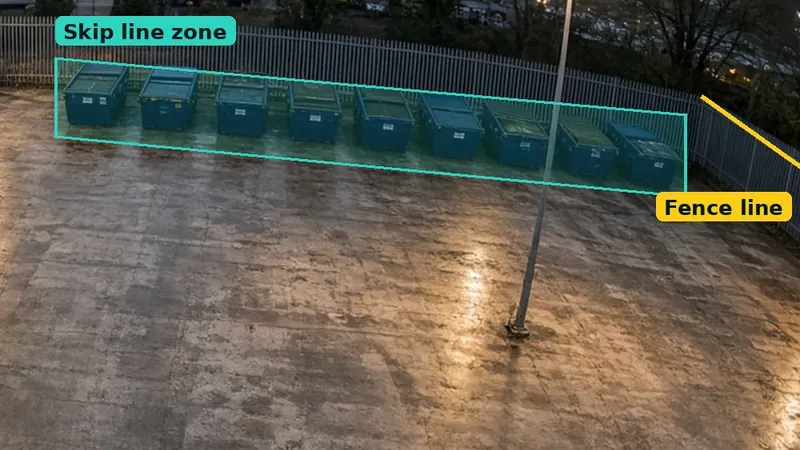
- 4Mark zones, lines and gaps. Where polygon detection areas and crossing lines would go, and where a new camera is needed.
- 5Agree detections and alerts. Which detections each camera runs, when, and who receives the alerts.
The point of marking zones at this stage is accuracy. A polygon drawn neatly round a row of skips, or a line along the top of a fence, tells the system exactly which part of the view matters, so alerts name the area and the rest of the picture is ignored. That is one of the main differences between Woodcock AI and basic motion alerts. See polygon detection zones for how they work.
What information should I prepare?
You do not need everything below to book, but the more we have, the faster and more accurate the quote.
Camera list
Rough count, makes and models if known, and the recorder make. A photo of the recorder label helps.
Site plan
Any drawing that shows buildings, bays and boundaries. A fire prevention plan drawing is ideal.
How the site runs
Opening hours, when the site is empty, and who should get alerts by day and by night.

If you have snapshots from each camera, send those too. A single still from each view usually shows straight away whether a camera can be used as it is, needs adjusting, or is pointing at the wrong thing. If your site is in a waste permit, our FPP detection section template shows the detail an officer will look for.
What does the quote include?
Every quote is written for the site, so the content varies, but it is built from the same parts. We do not publish prices; the quote sets out exactly what is proposed for your site.
- Woodcock AI on your existing cameras. Each camera that has a usable view and stream, connected over RTSP or ONVIF. Your recorder normally stays as it is.
- New cameras, only where needed. Hikvision ColorVu turret or bullet cameras, pre-configured for detection before they arrive. See our Hikvision smoke detection camera page.
- Installation. Mounting, poles or brackets, cable runs, power and any network work.
- Zones, lines and schedules. Set up per camera, for example intrusion only when the site is closed, with smoke and fire watching around the clock.
- Detections. Smoke and fire, intrusion, line crossing, PPE (hard hats & hi-vis) and vehicles, as agreed for each camera.
- Alerts and integrations. Alerts by app, with a short clip, and by email. Sirens or a fire alarm panel input can be wired in, and an alarm receiving centre (ARC) is an optional add-on.
For more on the factors that move the figure up or down, read what drives the cost of fire detection cameras. If you want to check your network can carry the extra streams first, try the CCTV bandwidth and storage calculator.
Can my current installer do the work?
Yes. Woodcock AI is sold direct and through CCTV installers and resellers. If you already have an installer you trust, they can fit and support the system while Woodcock AI runs on the cameras. If you would rather deal with one company, we offer an end-to-end design, supply and install service: site survey, design, supply, installation, commissioning, go-live and ongoing support.

Installers who want to offer AI detection to their own customers can read about our white-label AI CCTV programme.
How long from assessment to go-live?
It depends mostly on hardware and access. A site where existing cameras can be used as they are needs far less work than one that needs new poles, cabling or network changes. Your quote sets out the proposed timeline for your site. The stages are always the same:
- 1Assessment and quote. We review the site and send a written quote.
- 2Installation. Any new cameras, mounts, cabling and integrations are fitted.
- 3Set-up. Streams connected, zones and lines drawn, schedules and alert recipients set.
- 4Commissioning. We run smoke tests on site, so you see the system detect before handover.
- 5Go-live and support. Alerts go to your team, and the models keep fitting themselves to each camera’s scene.

Woodcock AI is self-learning: models are fitted to each camera’s view and trained on that site’s normal, no-incident footage and on synthesised smoke. It has been built over several years and is running on real UK sites today. Read more about our self-learning AI or see how it works.
Not ready for a full quote? Ask for an on-site demo, or a live test on your cameras: we connect two or three of your own cameras for about a fortnight so you can see real alerts from your site.
Get your AI CCTV installation quote
Book a site assessment and we will review your cameras, mark any gaps and send a written quote for your site.
Related pages
Frequently asked questions
What happens in a site assessment?
We talk through what you want to protect, review your cameras and recorder, check each view, mark where detection zones, crossing lines and any new cameras would go, and agree detections and alert recipients. You then get a written quote.
Do you cover my area of the UK?
We work with sites across the UK, either directly or through local CCTV installers and resellers. Tell us where your site is when you book a site assessment.
Can my current installer do the work?
Yes. Woodcock AI is sold direct and through CCTV installers and resellers, so your installer can fit and support the system, or we can design, supply and install it for you.
How long from quote to go-live?
It depends mostly on hardware and access. Using existing cameras as they are is much quicker than adding poles, cabling or network work. Your quote sets out the proposed timeline, ending with on-site smoke tests before go-live.
What information should I prepare?
A rough camera list with makes and models if known, the recorder make, a site plan (a fire prevention plan drawing is ideal), your opening hours and who should receive alerts. Snapshots from each camera help too.
Do you supply cameras as well as software?
Yes. Where an existing camera cannot cover an area, we supply Hikvision ColorVu turret and bullet cameras, pre-configured for detection. Woodcock AI also runs on existing cameras or recorders that provide an RTSP or ONVIF stream.
Last reviewed 29 October 2026