

CCTV maintenance checklist for business: servicing and health checks
A CCTV maintenance checklist is a routine for keeping business cameras recording clear, correctly timed and usable footage. Glance at every camera daily, play back last night’s recordings weekly, check the clock, real retention and night views monthly, clean reachable lenses and practise an export quarterly, and have a competent installer service the whole system to an agreed schedule, often once a year. Check the time after every clock change, keep a dated log, and follow the police requirements for CCTV and the ICO’s guidance.

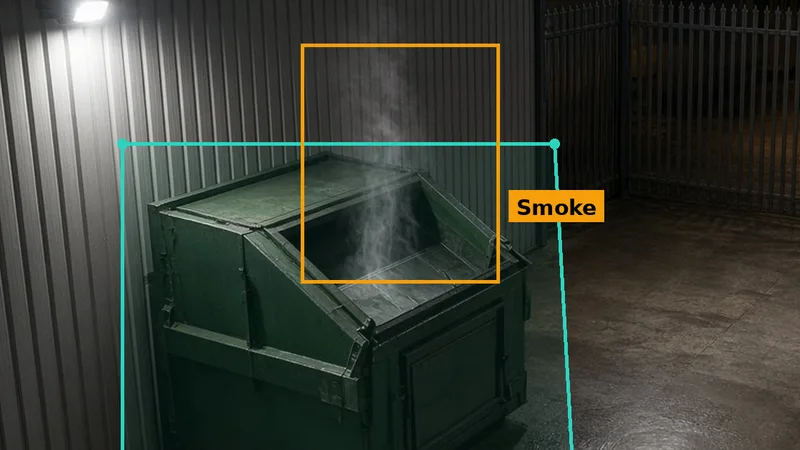
Last updated 3 November 2026. Most business CCTV is installed, switched on and then forgotten until the day something happens. That is the day people find out the camera over the yard has been looking at a cobweb for a month, the recorder stopped writing to its disk in the summer, or the time stamp is an hour out because nobody changed it when the clocks went back. In 2026 the clocks went back on Sunday 25 October, so if your recorder does not change by itself, its clock may already be wrong.
The guidance on this is clear. The UK police requirements for CCTV systems, published by the Home Office, ask for "regular maintenance of all aspects of the system", and name camera focus, cleaning of lenses and housings in particular. The National Business Crime Centre's small business guide says the clock should be "regularly checked for accuracy (taking account of GMT and BST)". The Information Commissioner's Office checklist for organisations using cameras includes regular checks that the date and time stamp is accurate. This guide turns that advice into a practical CCTV maintenance checklist for UK businesses: what to check, how often, who should do it and what to ask of your installer.
We make AI smoke, flame, people and vehicle detection for existing CCTV cameras, so we see a lot of camera views, good and bad. A clean, sharp, well-aimed camera with a correct clock is what makes any footage useful, whether a person is watching it, the police are reviewing it or software is looking for smoke in it. Near the end we explain why maintenance matters even more when cameras do detection work, and where Woodcock AI fits. Most of this page, though, applies to any CCTV system, with or without AI.
Why CCTV maintenance matters
A camera system has one job that matters more than any other: to record a clear, correctly timed picture of what happened, and to let you get that picture out quickly when someone needs it. Everything else is detail. A system that looks fine on the monitor in the office can still fail that job in several quiet ways, and none of them announce themselves. The disk does not shout when it fills up. A spider does not ask before it builds a web across the infrared lamps. A camera knocked by a lorry mirror does not send a message to say it now looks at the sky.
That is why the police guidance stresses checking recorded footage, not just the live picture. It notes that recorded video, and stills taken on a phone from a screen, are often of poorer quality than the live view, and it asks you to judge the system by what it recorded. It also says not to reduce the recording quality just to fit more days on the disk. If the recorded picture cannot show who or what was there, the camera has not done its job, however many days of footage you keep.
There are four practical reasons to maintain CCTV properly. The first is evidence: footage that is clear, correctly timed and quick to export is far more useful to the police and to your insurer. The second is safety and loss prevention: cameras that work can show a fire starting, a break-in in progress or a near miss in the yard, and help you stop the next one. The third is your legal duty: if your cameras capture people, UK GDPR and the Data Protection Act 2018 apply, and the ICO expects systems to produce clear images, keep accurate time stamps and store footage securely. The fourth is money spent: a camera system is a real investment, and one that quietly stops working is wasted.
The amended Surveillance Camera Code of Practice, which public bodies must follow and which is good practice for everyone else, makes the same points in its guiding principles. Principle 8 asks operators to meet and maintain approved standards, principle 10 asks for regular review and audit, and principle 11 says images and information should be of evidential value, with the integrity of metadata, such as the time and date, protected. Maintenance is how you meet those principles in practice.
What goes wrong with business CCTV
The faults that ruin footage are rarely dramatic. Here are the common ones, drawn from the police requirements, the National Business Crime Centre guide and police force guidance on CCTV evidence. None of them needs an expert to spot. They need someone to look, regularly, at the recorded picture from every camera, by day and at night.
The picture. Dirt, salt, pollen, bird mess and water spots build up on lenses and domes, softening the picture until faces and number plates are unreadable. Spiders love the warmth of a camera and the insects drawn to its infrared lamps, and a single strand across the lens can flare white at night. Condensation inside a housing can fog the whole view. Focus can drift after a camera is knocked or after a lens is adjusted.
The aim. Cameras get knocked by vehicles, ladders, wind and vandals. Trees and hedges grow into the view over a summer. Stock gets stacked in front of a camera, or a new container is parked where the camera used to see the gate. The camera keeps recording, but no longer what you need.
The night view. Many incidents happen after dark. Infrared lamps fail, or reflect off a nearby wall, soffit or dome cover and wash out the picture. Yard lights that the camera relied on burn out or are switched off by a timer. A view that looks perfect at midday may be useless at 02:00.
The recording. Hard drives wear out and fill up. A camera can drop off the recorder after a power cut or network change and nobody notices because the other cameras still show. Recording schedules get changed. The retention period, how long footage is kept before it is overwritten, may be much shorter than people think.
The time. Derbyshire Constabulary's CCTV evidence policy notes that many systems lack an internet connection and have inexpensive internal clocks which are prone to drifting. Others never get changed between GMT and British Summer Time. A time stamp an hour or several minutes out makes footage harder to match with other evidence.
The export. When the police ask for footage, the person on site often does not know how to find it, export it or copy it onto a memory stick in a format the police can play. By the time someone who does know arrives, the footage may have been overwritten.
Who is responsible for CCTV maintenance?
If your business operates the cameras, your business is responsible for them. That is true whether you bought the system outright, lease it or had it fitted by a landlord. In data protection terms you are usually the controller of the footage, and the ICO's checklist for limited CCTV systems asks you to name an individual who is responsible for the operation of the system, to review it regularly and to keep a dated record of those reviews with a date for the next one. In practical terms, somebody in the business has to own the cameras, even if the hands-on work is done by an installer.
Most businesses split the work. Someone on site does the simple, frequent checks: are all the cameras showing, is the recorder recording, does last night's footage look right. An installer does the skilled, less frequent work: cleaning high cameras, checking focus and infrared, testing the recorder and disks, installing firmware updates and fixing faults. If you have an IT person or provider, they usually look after the network the cameras sit on, the passwords and remote access. And your insurer may have something to say too, because some policies or surveys refer to CCTV and expect it to be kept working.
Write the split down. A short note that says who checks the cameras each morning, who plays back footage each week, who the installer is, what the maintenance contract covers and who can export footage is worth more than any amount of good intention. Put it next to the recorder and in the place where the police or a manager would look for it. The police requirements suggest a trained operator and a simple user manual should be available locally, so that footage can be found and exported without waiting for someone to travel in.
How often should CCTV be serviced?
There is no single legal frequency for servicing business CCTV. The NSI's code of practice for the design, installation and maintenance of CCTV systems, NCP 104, expects both corrective maintenance, which is fixing faults, and preventive maintenance carried out to an agreed schedule, with a checklist of what each preventive visit covers. The schedule is agreed for your system, so ask your installer what it is and why. Many businesses with a maintenance contract have a preventive visit once or twice a year. Sites with a lot of dust, salt, insects, vehicles or trees often need more.
What matters more than the installer's visit is what happens between visits. A camera can fail the day after it was serviced. So the most useful rhythm combines quick, frequent checks by someone on site with a proper service by a competent installer. Here is a sensible starting point for a small or medium business. Adjust it to your site, your risks and any conditions in your insurance policy or contract.
Every day: look at the live view from every camera, ideally on the recorder's own screen or the app, and check the recorder shows no warnings. This takes a minute and catches a camera that has gone black, a recorder that has frozen or a view that has been blocked.
Every week: play back a few minutes of recorded footage from each camera, including some from the night before. This is the check that catches the faults the live view hides: a camera that shows live but is not recording, a night view washed out by infrared glare, or a recording schedule that has changed.
Every month: check the recorder's clock against a reliable time source, check how many days of footage are stored and how full the disk is, and look at each camera's view after dark. Once a month is also a good time to check that the people who need app or remote access still have it and the people who have left do not.
Every quarter: clean domes and lenses you can reach safely from the ground, clear cobwebs and check nothing has grown or been stacked into the views. Do a practice export of a short clip, so someone keeps the skill fresh.
Every year: have a competent installer carry out a full preventive maintenance visit, including high cameras, focus, infrared, cabling, power supplies, the recorder and its disks, firmware updates and a review of whether each camera still does the job it was put there for.
After anything unusual: check the cameras after storms, building works, roof or gutter repairs, power cuts, network changes, vehicle strikes and every clock change. These are the moments when cameras get moved, damaged or reset.
Keep a simple log
Record each check. A dated line saying who looked, what they checked, what they found and what was done is enough. It shows the system is looked after, which helps with the ICO's expectations, insurance conversations and any challenge to the footage as evidence. It also shows patterns: a camera that needs cleaning every month, a disk that keeps throwing errors or a view that keeps getting blocked by the same stack of pallets. The police requirements also suggest keeping a record of who has accessed the system, which fits naturally in the same log.
Picture checks: lens, housing, focus and aim
Most CCTV problems are picture problems, and most picture problems are visible to anyone who looks carefully at the recorded footage. The police requirements single out camera focus and the cleaning of lenses and housings as parts of regular maintenance, and they are the parts that slip first. Here is what to look at on each camera.
Lenses and domes
Outdoor cameras sit in the weather all year. Rain leaves water spots, traffic and yards throw up dust and grime, coastal sites get salt, and birds and insects leave their own marks. A dome cover magnifies the problem, because any smear on the curved plastic scatters light into the lens, especially at night when the infrared lamps or a nearby floodlight shine through it. The picture rarely goes from good to bad in one day. It softens slowly, so the people who look at it every day often do not notice.
Clean what you can reach safely from the ground with a soft brush or a blower to lift grit first, then a clean lens cloth with water or a mild cleaner the camera maker approves. Do not use abrasive pads, strong solvents or paper towels on a dome, because scratches are permanent and catch the light. Clean the inside of a dome only if the housing is designed to be opened and you know how to reseal it, because a poorly sealed housing lets in moisture. Cameras that need a ladder, a tower or a lift are a job for your installer.
Spiders and cobwebs
Cobwebs are one of the most common causes of poor night footage. Cameras are warm, sheltered and lit, and the infrared lamps attract insects, which attract spiders. A web across the lens can look like faint lines by day but flare bright white at night, hiding the scene and, on a system with motion alerts, triggering alert after alert as it moves in the wind. Autumn is usually the worst season.

Brush webs away from the camera body, the sunshield and the bracket as well as the lens, otherwise the spider is back within days. Some installers use a pest repellent around the bracket, but check with the camera maker first, because some chemicals damage plastics and seals. On a camera that keeps getting webs, check again a week after cleaning.
Focus and sharpness
Focus can drift after a camera is knocked, after a varifocal lens is adjusted or when a camera that was focused in daylight is used mostly at night. Check sharpness on fine detail rather than overall impression: the mesh of a fence, the edge of a kerb, the lettering on a sign at the far side of the yard. Look near and far in the view. If faces or vehicles need to be recognised in a particular spot, check that spot specifically.
The police requirements suggest a simple subjective test: have a volunteer walk through the view and check, on the recorded footage, whether they can be seen and identified as well as you need. It is the most honest test of a camera, because it checks the whole chain from lens to recorder to playback in one go.
Aim and field of view
A camera that has been knocked, or whose view has been blocked, keeps recording, so the recorder thinks everything is fine. The only way to catch it is to compare the view with what it should be. The simplest tool for that is a reference picture: when the camera is fitted or serviced, save a still from it by day and by night, and keep them with the log. At each check, compare the current view with the reference. Is the gate still in the view? Is the bottom of the picture now all ground? Has the hedge grown across the top corner?
Common causes of a changed view are vehicles, ladders and machinery striking low cameras, wind loosening brackets, contractors moving cameras to get at gutters or signs, and plain growth: trees, hedges and climbing plants can block a view in a single summer. Stock, skips, containers and parked vehicles are the other big one. If the business has changed how it uses the yard, the cameras may need to change too. Our guide to CCTV camera placement explains how to choose and check each view.
Night and infrared checks
Cameras do much of their most important work after dark, when sites are empty and incidents are more likely to go unnoticed. Yet most checks happen in daylight, during working hours. Make a point of looking at every camera's recorded footage from the middle of the night at least once a month, and every time the clocks change. After 25 October the evenings are darker earlier, so views that were still in daylight at 17:30 in September are now night views.
Look for infrared lamps that have failed, often only on one side, leaving half the picture dark. Look for glare: infrared light bouncing back off a nearby wall, soffit, sunshield, dome cover or cobweb and washing out the picture. Look for yard and building lights that have failed or whose timers have drifted, especially if the camera relies on them for a colour picture. And look at whether the camera switches cleanly between day and night modes at dusk and dawn rather than flickering between them.
If a night view is poor, the fix may be cleaning, re-aiming slightly away from a reflective surface, adding or repairing lighting, or asking your installer about the camera's night settings. Do not assume a camera that is good by day is good at night. For sites with flammable stock or waste, the night view of the yard is often the one that matters most.
Recording, storage and retention
The recorder is the heart of the system and the part least often looked at. It sits in a cupboard or a comms cabinet, its disks spin day and night, and the only time anyone opens its menus is when they need footage. Check it properly at least once a month.
First, is every camera recording? Open playback for each channel, not just the live grid. A camera can show live but not record if its schedule has been changed, its storage settings have been reset or it has dropped off and rejoined the network. Second, is the storage healthy? Most recorders show the status of each disk; look for warnings, errors or a disk that is no longer listed. Disks wear out, and a recorder that has run for years without a disk change is a risk. Third, what is the recording quality? The police requirements are clear that the quality should not be reduced just to fit more days of footage on the disk.
How long should CCTV footage be kept?
The National Business Crime Centre's small business guide says a minimum of 14 days is recommended for small CCTV systems. The police requirements say video recordings should cover a sufficiently long period to assist investigations, and that retention beyond 31 days may be useful in some circumstances, as long as it does not affect the quality of the more recent recordings. At the same time, data protection law says you should not keep personal data for longer than you need it, so the ICO expects you to set and document a retention period that fits your purpose. Many businesses settle on somewhere between those figures and write the reason down.
The figure in the settings is not always the real one. Recorders overwrite the oldest footage when the disk is full, so the true retention depends on how much each camera records, which changes with the season, the weather and how busy the site is. The Home Office guidance on recovering video evidence suggests checking the overwrite time by looking at the earliest footage still on the system. Do this monthly, for a busy camera and a quiet one, and compare it with your policy.
Know how to stop an important clip being overwritten. The police requirements ask that relevant recordings can be protected from overwrite, and most recorders let you lock or export a clip. If something happens, export or lock the footage straight away, even before the police ask for it. Our CCTV bandwidth and storage calculator helps estimate how much storage a given number of cameras needs.
Time and date: check the clock after 25 October
The time stamp is one of the most important parts of CCTV footage and one of the most often wrong. The police requirements say the system clock should be set correctly and maintained, taking account of GMT and BST, and that time and date information is critical to an investigation; if it is incorrect, it can drain police time and resources. The ICO's guidance includes regular checks that the date and time stamp recorded on images is accurate, giving the switch between summer and winter time as the example.
Clocks drift. Derbyshire Constabulary's policy on CCTV evidence notes that many systems lack an internet connection and have inexpensive internal clocks which are prone to drifting. Some recorders are set to change between GMT and BST automatically, some are not, and some change twice because both the recorder and the cameras do it. The Home Office guidance on recovering video evidence also warns that IP systems may reference more than one clock, for example the recorder's and each camera's, which can disagree.
In 2026 the clocks went forward on 29 March and went back on Sunday 25 October. In 2027 they go forward on 28 March and back on 31 October. Put a time check in the diary for the Monday after each change. It takes five minutes: compare the time shown on the recorder, and on a few cameras if they show their own time, with a reliable source such as a phone. If they differ, note the difference in the log, then correct the clock or ask your installer to set the recorder to take its time from a reliable network time source.
If footage has to be handed over while the clock is wrong, do not try to fix the time first. Write down the difference between the time on the system and the real time, and when you checked it, and give that note to the police with the footage. The Home Office guidance asks for exactly this: a check against a reliable time source, with any difference recorded.
Playback and export: can you hand footage to the police?
When something happens, speed matters. Recorders overwrite footage on a loop, and the police may not be able to send someone to collect it for days. The police requirements say a system operator should be available to replay and export recordings, and that a simple operator's manual should be available locally. They also ask that the operator knows the retention period and roughly how long it takes to export a short amount of footage, such as 15 minutes, a medium amount, such as 24 hours, and the whole system.
The export itself needs to be right. The police requirements say the initial export should be in the native format of the recording system, at the same quality as stored, and that the export should include any software needed to view or replay the footage. The National Business Crime Centre guide makes the same point about including the player. Converting footage to a phone video or filming the monitor loses quality and often loses the time stamp.
Practise. Once a quarter, have the people who might need to export footage do it: pick a 15-minute clip from the night before, export it to a clean memory stick, take it to a different computer and check it plays, with the time and date visible. Time how long it takes, write down the steps, and leave the written steps beside the recorder. When the day comes, the person on duty can follow them without waiting for anyone.
Power, network and cyber security
Behind every camera is a chain of power supplies, cables, network switches and the recorder. A failed power supply, a loose connector in a junction box or a network switch that did not come back after a power cut can take out one camera or all of them. Many systems power cameras over the network cable from a switch or the recorder, so a single failure there can black out a whole side of the site.
At the monthly check, look at the comms cabinet or cupboard: is it clean, dry and ventilated, are the lights on the switches and recorder normal, is anything hot, unplugged or hanging loose? If you have an uninterruptible power supply, check it is not showing a battery warning; batteries wear out. After any power cut, planned or not, check that every camera is back and recording. This is one of the commonest ways for a camera to go missing without anyone noticing.
Cameras and recorders are network devices, and they need the same basic care as any other. The National Cyber Security Centre's device guidance says to install updates promptly when notified, ideally within a few days, that it is increasingly important to manage firmware updates, and that you should replace unsupported software and devices as soon as you are able. The NSI says CCTV systems need firmware and software updates as threats evolve, and NCP 104 expects updates to be part of maintenance, with critical updates handled outside the normal schedule. The Surveillance Camera Code's principle 9 asks for appropriate security measures to protect against unauthorised access and use.
In practice: change default passwords, give each user their own login, remove people who have left, keep remote access to what is needed, install firmware updates from the maker, and save a copy of the recorder's settings so they can be restored. NCP 104 also asks installers to delete unused passwords and open ports and to get permission before connecting their own laptops to your network. Ask your installer whether they do. The NCSC's small organisations guide covers the wider basics.
Weather and the seasons
Each season brings its own camera problems, so a good maintenance plan changes through the year. Autumn brings spiders and cobwebs, falling leaves and the clock change, with darker evenings exposing weak night views. Winter brings condensation inside housings, frost and snow on domes and sunshields, storms that loosen brackets and power cuts. Spring brings the forward clock change, pollen on lenses and nesting birds. Summer brings growth: trees and hedges can grow across a view in weeks, and low sun can glare straight into cameras at certain times of day.
After every storm, check that every camera still shows the right view and is recording. Snow or ice on a dome usually clears as it thaws, but if a camera covers a critical area, check it after heavy snow. Do not knock snow off cameras with a broom from a ladder in icy weather; wait, or ask the installer. Condensation that keeps coming back inside a housing usually means a failed seal, which is a job for the installer.
Safe working at height
Many cameras are fitted high on walls, poles and roof edges, out of reach of vandals and out of reach of staff with a cloth. The Health and Safety Executive's guidance says ladders can be a sensible and practical option for low-risk, short-duration tasks, although they should not automatically be your first choice. Before anyone climbs, ask whether the job can be done from the ground, whether it is short and low risk, whether the ladder or access equipment is right for it and the person is competent, and whether power needs isolating first.
For most businesses the sensible split is that staff clean and check what they can reach from the ground, and everything higher goes to the installer, who should have the right access equipment, training and insurance. If cameras regularly need cleaning, it is worth asking at the next service whether some could be moved or fitted with longer brackets that are easier to reach, without spoiling the view.
Maintenance contracts and the installer's visit
If you have a maintenance contract, read it. The NSI says a maintenance contract should make clear where responsibilities and costs lie, including software and firmware updates, battery replacement and maintenance of illumination. It also says NSI approved companies installing CCTV are expected to respond to a fault with your system within 24 hours, and that you should receive training and user documentation when the system is handed over. If you do not have a contract, many installers will quote for a one-off service and health check.
Insurer guidance points the same way. Aviva's loss prevention standard on video surveillance systems lists the police requirements and the Surveillance Camera Code as useful documents for owners to review. For remotely monitored systems it says the response plan should cover any activation or signal fault, and that the people who attend should have the authority to expedite essential repairs. In plain terms: decide in advance who gets a camera fixed, and how quickly, and discuss any planned changes with your insurer or broker.
A good preventive visit covers every camera, not a sample. NCP 104 sets out checklists for preventive and corrective maintenance. Expect the installer to clean and inspect each camera and housing, check mounting, aim and focus against the agreed view, check infrared and lighting, inspect cables and power supplies, check the recorder, its disks, its clock and its recording settings, install updates, test export, and give you a written report of what was found and done. Ask for the report, read it, and file it with your log.
The installer's visit is also the time to ask bigger questions. Does each camera still do the job it was designed for? Has the site changed? Are there views that would be better covered by moving a camera, adding one or improving the lighting? Is any of the equipment unsupported, so no longer getting updates? The answers belong in your plan for the next year.
Taking over a system you did not install
Many businesses inherit their CCTV: with a new lease, after buying a business, when a facilities manager leaves or when the original installer stops trading. Often nobody knows the recorder password, how many cameras there are, where the recorder is or how long it keeps footage. That is the moment to do a first health check, before anything happens that you need footage of.
Start with a list. Walk the site and note every camera, where it is, what it points at and whether it is working. Find the recorder and any network switches or power supplies. Find the logins: the recorder, the app and any remote access. If nobody has them, an installer can usually reset the recorder, but that may wipe settings and stored footage, so ask first. Then do the checks in this guide for each camera: live and recorded, day and night, time and date, retention, and a test export. Write up what you find, who owns each fault and what happens next. Change every password you inherited, and remove access for people who no longer need it.
A first check also tells you whether the system is worth keeping. Some inherited systems are sound and just need cleaning, re-aiming and a new disk. Others have cameras that cannot produce a useful picture of what matters now, or a recorder that no longer gets updates.
When to repair, upgrade or replace
Maintenance keeps a system working, but it cannot make an unsuitable system suitable. Each year, as part of the review, ask whether each part of the system still does the job. A single faulty camera in an otherwise sound system is a repair. A good camera with a view that no longer fits how the site is used is a re-aim or a move. A recorder whose disks are full after a few days, or a yard that is too dark at night, may need an upgrade to storage or lighting rather than new cameras.
Replacement is worth considering when equipment no longer gets security or firmware updates, which the NCSC says should lead you to replace unsupported devices as soon as you are able, or when the recorded picture cannot meet the purpose of the camera even when clean, focused and well lit. The police requirements are a useful test here: can the system show the people, vehicles or events you need, with the time and date, and can someone on site export them? If the answer is no after maintenance, the system needs more than maintenance.
Before you replace anything, check what you already have. Many existing IP cameras can do far more than record. Our guide to adding AI to existing CCTV explains how detection can be added to cameras already on the wall, and our guide to video smoke detection on existing CCTV covers smoke and flame in particular.
Why maintenance matters even more with AI detection
Everything above applies to any CCTV system. But if your cameras do detection work, such as AI smoke and flame detection or people and vehicle detection, maintenance matters even more, because software is now relying on the picture in real time rather than a person looking at it after the event. A person reviewing footage can squint through a smear. Detection works best on a clear, stable view.
Early smoke is faint and thin. A dirty dome or a cobweb glowing in the infrared light can hide it, and at night that matters most. Detection zones, such as a polygon zone drawn around a compactor, a skip bay or a gate, are drawn on the camera's view, so if the camera is knocked a few degrees the zone no longer sits over what it was meant to watch. A failed infrared lamp leaves a dark corner. And a recorder that has stopped recording means alerts may arrive without the clip you need.
Poor camera health also drives false alerts on many systems. A web moving in the wind, rain on a dome or infrared glare can look like movement to simple motion detection. Our guide to reducing CCTV false alarms covers this in more detail. Good maintenance is the simplest way to make any detection more reliable.
So add two things to the routine if your cameras run detection. First, after any camera is moved, re-aimed or replaced, check that its detection zones still sit where they should and test it, for example with a walk-through for people detection. Second, include detection in the installer's annual review: are the zones still right for how the site is used now?
Three common faults, and what they look like
Choose a kind of fault below to see what it looks like on camera and how to deal with it.
Which kind of fault?
Dirt, water spots, cobwebs and condensation are the commonest reasons a camera picture softens. Clean what you can reach from the ground every quarter with a soft brush and a lens cloth, leave high cameras to the installer, and check the recorded night view afterwards, because that is where dirt shows most.
Clean, dry, no webs
A camera that has been knocked, or whose view has been blocked by growth or stock, keeps recording, so the recorder thinks all is well. Compare each view with a saved reference picture at every check. If a camera has moved, re-aim it, and check that any detection zones drawn on the view still sit where they should.
Matches the reference picture
Storms loosen brackets, snow and ice sit on domes, and condensation fogs housings that have lost their seal. Check every view and the recording after bad weather. Wait for snow to thaw rather than climbing in icy conditions, and report condensation that keeps coming back to the installer.
Checked after storms and snow
Each kind of fault has its own check and fix.
What AI on your cameras is not
Be clear about the limits. AI detection on cameras is not a maintenance service: it does not clean lenses, fix recorders or replace your checks and your installer's visits. Smoke and flame detection on cameras is not a fire alarm system, and people detection is not an intruder alarm; neither replaces certified alarms or monitoring. It sees only what the cameras can see. What it adds is early sight of smoke, flame, people and vehicles on cameras that you keep in good order.
Maintenance and privacy
Maintenance is part of using cameras lawfully. The ICO's checklist for limited CCTV systems expects a system that produces clear images you can easily disclose to authorised third parties, regular reviews by a named person and a dated record of them. Its guidance on the data protection principles includes regular checks that the date and time stamp is accurate, and secure storage to protect the confidentiality, integrity and availability of footage. The ICO notes that its video surveillance guidance is under review following the Data (Use and Access) Act, so check the current version. Our guide to AI CCTV and GDPR in the UK explains how AI detection fits.
CCTV maintenance checklist
Here is the whole checklist in one place. Print it, add your own items, and keep it with the log beside the recorder.
Every day
- Look at the live view from every camera
- Check the recorder or app shows no warnings
- Report any camera that is black, frozen or blocked
Every week
- Play back a few minutes from each camera, including last night
- Check every camera is recording, not just showing live
- Look for webs, glare or a changed view
- Log the check: date, name, findings
Every month
- Check the recorder clock against a reliable time source
- Find the earliest footage and work out the real retention
- Check disk status and how full the disks are
- Look at each camera after dark
- Check who has app and remote access; remove leavers
- Look at the comms cabinet: clean, dry, nothing loose or hot
Every quarter
- Clean domes and lenses you can reach from the ground
- Clear cobwebs from cameras, sunshields and brackets
- Check trees, hedges and stock are clear of views
- Run the export drill and update the written steps
- Compare each view with its reference picture
Every year
- Installer preventive maintenance visit and written report
- High cameras cleaned, focus and infrared checked
- Recorder, disks, power supplies and cabling checked
- Firmware updated; unsupported kit identified
- Review whether each camera still does its job
- Review retention, signs and your ICO checklist
After anything unusual
- After every clock change: check the time
- After storms, works or vehicle strikes: check views
- After power cuts: check every camera is back
- After a camera is moved: update its reference picture
A worked example
Here is how this might look for a fictional small distribution unit with eight cameras, a rear service yard and a waste compactor. It is an example, not a real business.
On Monday 26 October, the day after the clocks went back, the office manager compares the recorder clock with her phone and finds it an hour fast; the recorder does not change by itself. She notes the difference in the log and resets it. That week's playback check shows a cobweb flaring across the rear yard camera at night and the gate camera now looking mostly at the wall after a delivery lorry clipped it. She books the installer, who visits on 2 November, cleans and inspects all eight cameras, clears the webs, re-aims the gate camera against its reference picture, sets the recorder to take its time from a network time source and installs a firmware update.
Because the site runs smoke and people detection on two cameras, the installer also checks the zones on the re-aimed gate camera and the manager does a walk-through test the next day. She saves new reference pictures, runs the export drill and files the installer's report with the log. At the monthly check in December she finds the real retention is 19 days, inside the business's written policy. Two weeks after the service, the rear yard camera's clean, sharp night view lets the detection pick up thin smoke at the compactor in time for the keyholder to call 999.
How Woodcock AI fits
Woodcock AI connects to existing IP cameras and runs on an edge server on site or on a cloud server. It adds smoke and flame detection, and people and vehicle detection, to the cameras you already have. You draw polygon zones over the places that matter, such as a compactor, a skip bay or a gate, choose when they are armed and who gets the alerts. Each alert has a snapshot, a short clip and an AI description of what the camera saw. Well-maintained cameras give it the best picture to work with.
Woodcock AI is self-learning, so it gets better over time at knowing what is normal on each camera, such as steam from a vent on a cold morning or headlights crossing the yard. It is the result of years of development and is now in use on real sites in the UK. It works alongside your maintenance plan, your installer and your alarms rather than replacing them. For more, see AI smoke and fire detection on cameras and how to choose an AI CCTV system. Ask your cameras (coming soon, early 2027) will let you type a question about what the cameras have seen.
Ways to start
Start with a site assessment. We look at what each of your cameras sees by day and after dark, point out views that are dirty, blocked or poorly aimed, and show where smoke, flame and people zones would help. Or ask for a live test on your cameras: we connect two or three of your existing cameras for about a fortnight, so you can see the alerts for yourself. We are also happy to arrange an on-site demo.
Sources
- Home Office, Police requirements for CCTV systems (GOV.UK, August 2022) and Recovery and Acquisition of Video Evidence (PDF, version 3.0).
- National Business Crime Centre, Small Business Guide to CCTV (PDF, November 2018).
- Derbyshire Constabulary, CCTV and multimedia within criminal investigations (PDF policy, July 2025).
- NSI, CCTV systems for business and commercial premises and NCP 104 Issue 3 summary (PDF, 2019).
- Information Commissioner's Office, video surveillance guidance, complying with the data protection principles and checklist for limited CCTV systems.
- Home Office, Amended Surveillance Camera Code of Practice; GOV.UK, When do the clocks change?
- Health and Safety Executive, Safe use of ladders and stepladders.
- National Cyber Security Centre, keeping devices and software up to date and small organisations guide to cyber security.
- Aviva, Loss Prevention Standards: video surveillance systems, an introduction (PDF).
We have summarised these sources in our own words. Guidance is updated from time to time, so read the current versions, follow your camera and recorder makers' instructions, and check any conditions in your insurance policy or maintenance contract. This page is general guidance, not legal or insurance advice. In an emergency, always call 999.
When did someone last play back your cameras at 2am?
Book a site assessment and we will look at what each of your cameras sees by day and after dark, point out views that are dirty, blocked or poorly aimed, and show where smoke, flame and people zones would help, or ask for a live test on your cameras.
Related pages
Frequently asked questions
What should a CCTV maintenance checklist include?
Daily: look at every camera and check the recorder shows no warnings. Weekly: play back recorded footage from each camera, including last night. Monthly: check the clock, the real retention period, disk health, night views and who has access. Quarterly: clean reachable lenses, clear cobwebs and practise an export. Yearly: a full preventive service by a competent installer. Log every check.
How often should CCTV be serviced?
There is no single legal frequency. The NSI code of practice for CCTV, NCP 104, expects preventive maintenance to a schedule agreed for your system, and many businesses have a full service once or twice a year. Dusty, coastal, wooded or busy sites often need more. Between visits, someone on site should check the cameras and recordings every day or week.
How do I check my CCTV is recording properly?
Play back recorded footage from every camera rather than relying on the live view, including footage from the night before. The police requirements for CCTV note that recorded video is often poorer than the live picture. Check every channel is recording, the disk shows no errors, the time stamp is right and the earliest stored footage matches your retention policy.
Do I need to change the CCTV clock when the clocks go back?
Check it. Some recorders change between GMT and BST automatically and some do not. The police requirements and the National Business Crime Centre both say the clock should be kept accurate, taking account of GMT and BST. In 2026 the clocks went back on 25 October; in 2027 they go forward on 28 March and back on 31 October.
How long should business CCTV footage be kept?
The National Business Crime Centre recommends a minimum of 14 days for small CCTV systems, and the police requirements say retention beyond 31 days may be useful in some circumstances. Data protection law says not to keep footage longer than you need, so set a period that fits your purpose, write it down and check the real figure by finding the earliest stored footage.
Does AI detection replace CCTV maintenance?
No. AI detection relies on the picture, so it needs clean, well-aimed, well-lit cameras even more than a person does. Woodcock AI is not a maintenance service, a fire alarm or an intruder alarm. It runs on an edge server on site or on a cloud server and adds smoke, flame, people and vehicle detection to cameras you keep in good order.
Last reviewed 3 November 2026